Go back to list of posts
Digital Business Card Cost: 2026 Pricing Guide
Last modified: August 19, 2026


Most professionals pay nothing or a modest monthly fee per user for a digital business card platform. Free tiers are widely available but carry real limits: capped contacts, no analytics, and no CRM sync. Paid personal plans typically run at a moderate monthly cost, with discounts for annual billing. Team plans price per seat, often at a few dollars per user per month at scale. Enterprise deals are custom-quoted and almost always include SOC 2 compliance, SSO, and dedicated support.
What actually drives digital business card cost:
- NFC hardware: A one-time purchase ranging in cost depending on the device, as detailed by Nfc.
- Seat count: Per-user pricing compounds fast; team minimums vary by vendor
- CRM integrations: Salesforce, HubSpot, and Microsoft Dynamics sync typically lives behind paid or enterprise tiers
- Analytics and lead capture: Scan tracking, contact attribution, and event ROI reporting are almost always premium features
- Compliance: SOC 2 and GDPR coverage adds cost but is non-negotiable for regulated industries
KADO covers all of these tiers, from a free individual plan through enterprise-grade deployments with SOC 2 compliance and deep CRM integrations for Salesforce, HubSpot, and Microsoft Dynamics.
Key Takeaways
For most teams, the real digital business card cost decision comes down to whether CRM sync and analytics justify the step up from a free or entry-level plan to a paid team tier.
How do digital business card prices compare across top platforms?
We reviewed six platforms hands-on: KADO, V1CE, HiHello, Mobilo, Wave Connect, and GetApp. We checked published pricing pages, tested free plan limits, confirmed hardware compatibility, and verified which integrations require an upgrade. Here is what we found.
| Platform | Individual/month | Team per-user/month | Free plan | NFC hardware (one-time) | Sharing methods |
|---|---|---|---|---|---|
KADO | Free–$10 | From ~$5/user | ✅ Yes, with limits | Available | QR, NFC, link, wallet, email sig, widget |
HiHello | ~$6/month | ~$5/user/month | ✅ Yes | Not offered | QR, link, email sig |
Blinq | ~$3–$5/month | ~$3/user/month | ✅ Yes | Available | QR, NFC, link |
Wave Connect | Free–$5/month | ~$4/user/month | ✅ Yes | Available | QR, NFC, link |
Mobilo | ~$4–$7/month | ~$4/user/month | ❌ No free tier | ✅ Included | QR, NFC, link |
V1CE | ~$8–$10/month | ~$6/user/month | ❌ No free tier | ✅ Premium cards | QR, NFC, link |
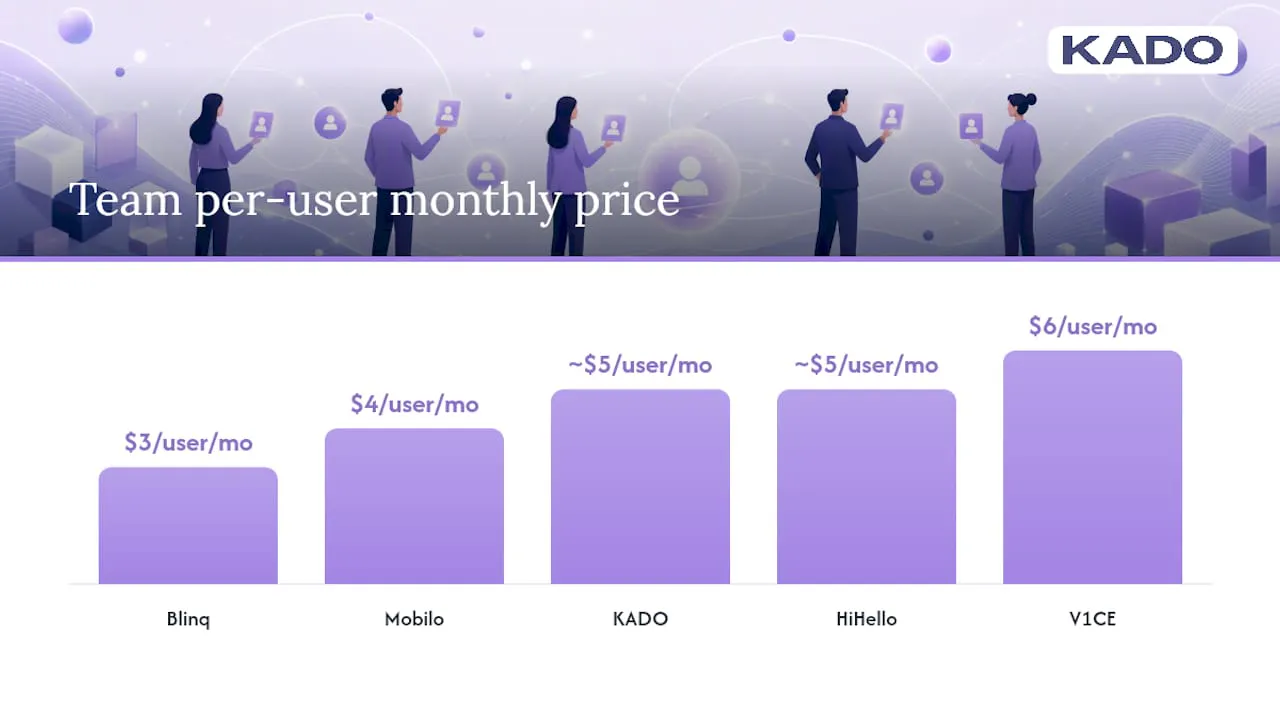
Annual billing typically offers a notable discount on effective monthly costs across most platforms, making it more cost-effective for team subscriptions. That gap adds up to hundreds of dollars per year.
Pro Tip: If a vendor quotes per-seat pricing above $7/user/month for teams of 15 or more, ask specifically for a team bundle or annual commitment discount before accepting the listed rate. Most vendors have unpublished thresholds where pricing shifts.
How do you calculate total cost of ownership for your team?
Sticker price is only part of the math. A lower per-user monthly plan with setup fees and required IT work may cost more overall than a higher-cost plan with native CRM sync and less setup complexity, and a card creation time of about 2 minutes. Here is a repeatable evaluation framework.
Step-by-step cost checklist
- List your baseline requirements: QR sharing, NFC, wallet passes, analytics, CRM sync, admin controls, SSO, compliance (SOC 2/GDPR). Mark which are must-haves vs nice-to-haves.
- Run the per-seat math: Multiply per-user monthly rate by seat count and by 12 for annual cost. Add hardware amortized over 2 years.
- Add integration and setup costs: Does the platform charge for API access or CRM connectors? Is there an onboarding fee?
- Estimate support costs: Free plans rarely include priority support. For enterprise rollouts, factor in implementation time and internal IT hours.
- Check scan or contact limits: Some platforms cap monthly scans or stored contacts on lower tiers. Hitting those limits mid-year forces an unplanned upgrade.
Questions to ask before you sign
- What is the minimum seat count for team plans?
- Can you downgrade or cancel mid-term without penalty?
- Is CRM sync included or a paid add-on?
- What is the data export policy if you leave?
- Does the SLA cover uptime guarantees, and at what tier?
Red flags to watch
- ⚠️ Setup or onboarding fees not listed on the pricing page
- ⚠️ Analytics locked behind the highest tier only
- ⚠️ Per-scan limits that reset monthly (common on entry-level plans)
- ⚠️ No clear cancellation or refund policy
- ⚠️ CRM integrations described as “available” but requiring a separate integration fee
TCO example: 25-person sales team
Switching to annual billing saves roughly $540 per year for this team before accounting for the productivity gains from CRM sync. Ease of setup also reduces internal support burden, a cost that rarely appears on a pricing page but shows up in IT tickets.
For enterprise buyers, SOC 2 and GDPR compliance are not optional line items. They shift the conversation from per-seat pricing to custom contracts, and vendors who offer them typically bundle SSO, audit logs, and dedicated account management into the quote.
Why KADO stands out for teams and enterprise buyers
KADO is built for the use cases where digital business card pricing decisions get complicated: large teams, CRM-dependent sales workflows, and event-heavy revenue cycles.
Key capabilities that affect pricing value:
- Team administration: Centralized brand templates, bulk card creation, and role-based admin controls reduce the per-card management overhead that inflates hidden costs
- CRM integrations: Native connectors to Salesforce, HubSpot, and Microsoft Dynamics mean captured contacts flow directly into existing pipelines, cutting manual data entry
- Multi-channel sharing: QR codes, NFC cards, Apple Wallet, Google Wallet, direct links, email signatures, and embeddable widgets cover every sharing scenario without add-on fees
- Lead capture forms: Collect contact details at events without requiring the other person to have the app
- Analytics: Track card views, contact saves, and link clicks at the individual and team level
- Compliance: SOC 2 and GDPR coverage for regulated industries and enterprise procurement requirements
For sales teams that attend conferences and trade shows, the ROI case is direct. KADO’s event lead capture and revenue attribution tools let you tie specific contacts to specific events, measure follow-up conversion rates, and report pipeline generated per event. That kind of attribution is what turns a networking tool into a budget line item that justifies itself.
KADO’s contact management workflows also include notes, tags, tasks, and follow-up reminders, so the value extends well beyond the card exchange itself. For HR teams managing onboarding at scale, that centralized control is a significant operational advantage.
The pricing trade-off most buyers get wrong
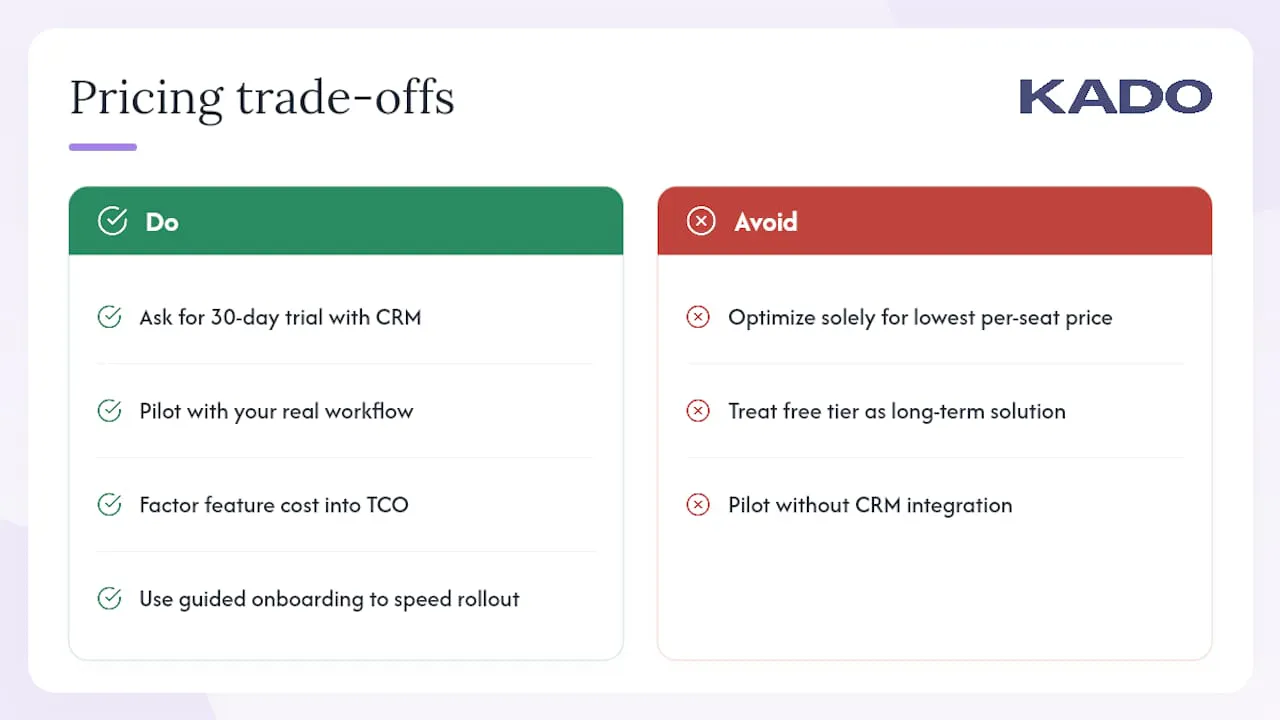
The most common mistake we see is optimizing for the lowest per-seat price and then discovering that the missing features cost more to work around than the upgrade would have.
A $3/user/month plan with no CRM sync means someone on your team is manually entering contacts after every event. At even 10 events per year with 20 contacts each, that is 200 manual entries. If each takes 3 minutes, you have spent 10 hours of staff time on data entry that a $5/user/month plan with native HubSpot sync would have eliminated.
The second mistake is treating the free tier as a long-term solution for teams. Free plans are genuinely useful for individual professionals testing the format. For a team of five or more, the lack of brand controls, analytics, and admin oversight creates inconsistency that undermines the whole point of standardizing on a digital card platform.
Pro Tip: When piloting with a vendor, ask for a 30-day expanded trial that includes the CRM integration you actually use. A pilot without your real workflow is not a real test.
Implementation timeline is often shorter than many buyers expect, with typical team rollouts completed within a few weeks., and platforms with guided onboarding compress that further. KADO’s web-based card creation means individual users can be up and running in minutes, which speeds adoption across distributed teams.
KADO is worth a custom quote for larger teams
For teams of 15 or more, or any organization that needs SOC 2 compliance, SSO, or deep CRM sync, a custom enterprise quote from KADO will almost always produce a lower effective per-seat cost than the published tier pricing.
Custom enterprise pricing typically includes volume seat discounts, dedicated onboarding support, and priority SLA coverage. For companies where events are a primary revenue channel, KADO’s event ROI measurement tools make the spend attributable rather than a line item that gets cut at budget review. You can also explore KADO’s contact management and CRM sync features to see exactly what integrations are included before requesting a quote.
Request a demo to get pricing scoped to your seat count, compliance requirements, and integration stack.
Sources
Frequently Asked Questions
Is a digital business card free?
Most platforms offer a free tier with limits on contacts, analytics, or sharing methods. Free plans work well for individual professionals but typically lack the brand controls and CRM sync that teams need.
How much do digital business cards cost per month?
Paid personal plans generally run $6–$10/month, while team plans price per seat at roughly $3–$8/user/month.
Are NFC business cards a separate cost?
Yes. NFC cards are a one-time hardware purchase, typically ranging from about $4 to $197 depending on the device and vendor. Amortize that cost over two years when comparing total spend against a software-only plan.
When does enterprise pricing make sense?
Custom enterprise pricing is worth requesting when your team exceeds 15 users, requires SOC 2 or GDPR compliance, needs SSO, or relies on native CRM integrations. KADO offers custom quotes that typically include volume discounts and dedicated support at those thresholds.
Can you cancel a digital business card subscription anytime?
Cancellation policies vary. Monthly plans are generally cancellable anytime; annual plans may not offer prorated refunds. Always confirm the downgrade and data export policy before committing to an annual contract.