Go back to list of posts
CRM Integration for Real Estate Agents: 2026 Guide
Last modified: July 13, 2026


CRM integration for real estate agents is the process of connecting lead sources, communication tools, and marketing platforms into one unified system that automates data capture, enriches prospect records, and accelerates deal closure. Agents who rely on disconnected spreadsheets and manual follow-up lose deals to faster competitors. The most effective real estate CRM systems combine direct native APIs, AI-powered lead enrichment, and customizable workflows to match how agents actually work. This guide covers the core components, integration methods, scaling strategies, and AI features that define best-in-class CRM software for realtors in 2026.
What are the essential components of CRM integration for real estate agents?
Effective CRM integration does more than sync contacts. It creates a live, connected pipeline where every lead source, conversation, and calendar event feeds into one place automatically.
The core components every agent needs include:
- Automated lead capture: Pulls inquiries from listing portals, social media ads, and website forms directly into the CRM without manual entry. No lead falls through the cracks during a busy showing day.
- AI-powered lead enrichment and scoring: Appends behavioral data, property search history, and contact details to raw leads before they reach your pipeline. This tells you who is ready to act and who needs nurturing.
- Direct native API connections: Links your CRM to lead sources without a third-party go-between. Direct API integrations provide real-time syncing with fewer failure points compared to middleware tools, which add latency and cost.
- Customizable workflow automation: Mirrors your brokerage’s actual sales stages, from first inquiry to closed deal. Generic pipelines force agents into rigid processes that do not reflect how real transactions move.
- Multi-channel communication syncing: Logs calls, texts, emails, and portal messages in one thread. You never search three apps to find what you said to a client last Tuesday.
- Calendar and showing integration: Syncs appointments, follow-up reminders, and open house schedules so nothing is booked twice and no callback is forgotten.
- Unified pipeline dashboard: Gives you and your team a single view of every active deal, its stage, and its next required action.
Pro Tip: Before selecting a CRM platform, map every lead source you use, including Zillow, your website, and Instagram ads, and confirm each has a direct native integration. A platform with over 1,100 native integrations gives you far more flexibility than one that relies on workarounds.
The unified dashboard is often undervalued. Agents who can see pipeline velocity at a glance make faster decisions about where to focus their time.
How do CRM integration methods compare, and why do direct APIs outperform middleware?
The method you use to connect your tools matters as much as the tools themselves. Two primary approaches exist: direct native API integrations and third-party middleware platforms like Zapier.
| Factor | Direct native API | Third-party middleware |
|---|---|---|
Sync speed | Real-time, two-way | Delayed by polling intervals |
Failure points | Low, single connection | Higher, multiple service dependencies |
Cost | Included in platform | Additional monthly fee per workflow |
Setup complexity | Moderate, guided by vendor | Low initially, complex at scale |
Data accuracy | High, no translation layer | Variable, mapping errors possible |
Direct API integrations maintain pipeline accuracy by avoiding third-party dependencies and the delays that middleware introduces. That matters in real estate, where a lead who submits a form at 9:00 PM expects a response before they wake up the next morning.
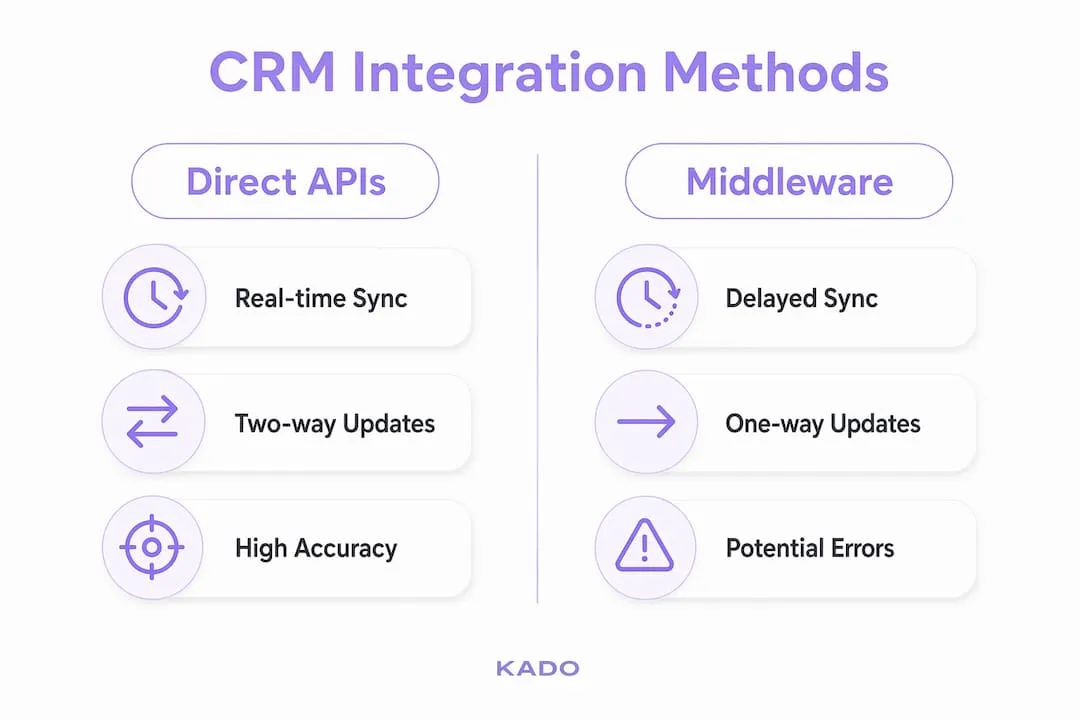
Middleware tools like Zapier work well for simple, low-volume automations. The problems appear at scale. Rate limits, service outages, and mapping errors can silently drop leads or push duplicate records into your CRM. An agent running 50 active leads a month may never notice. An agent running 500 will.
AI-driven automation tools can now integrate with major real estate CRMs in under 15 minutes without custom code, supporting over 1,500 connections. That speed removes the technical barrier that once made direct integrations feel out of reach for independent agents.
Pro Tip: Ask any CRM vendor to show you a live two-way sync test before you commit. If a contact update in your portal does not appear in the CRM within 60 seconds, the integration is polling-based, not real-time.

How do you customize and scale CRM integrations as your business grows?
Customization is where most agents underinvest. A CRM configured for a solo agent looks nothing like one built for a 20-person brokerage team, and the gap only widens as you grow.
- Audit your current workflow before touching the CRM. Write down every step from lead inquiry to closed deal. Note where you currently lose time, miss follow-ups, or duplicate data entry. Your CRM should reflect this map, not replace it with a generic template.
- Use no-code customization to build your pipeline stages. No-code CRM boards let agents align automation rules and deal stages with their specific brokerage process. You can create stages like “Showing Scheduled,” “Offer Pending,” and “Under Contract” without writing a single line of code.
- Align CRM fields with your actual data needs. Add custom fields for property type preferences, pre-approval status, and preferred neighborhoods. Standard contact fields rarely capture what a real estate agent needs to qualify a buyer or seller.
- Plan your integration architecture for the team you want, not the team you have. Enterprise-grade platforms built on Salesforce offer the scalability, security, and integration depth that growing brokerages need. Starting on a platform with a ceiling forces a painful migration later.
- Establish data hygiene rules from day one. Decide who can edit contact records, how duplicate leads are handled, and how often the database is audited. Successful real estate teams avoid one-size-fits-all CRMs by building processes that prevent dirty data from accumulating.
- Document every automation you build. When a team member leaves or a workflow breaks, documentation is the only way to diagnose the problem quickly. A CRM with undocumented automations is a liability.
Scaling a CRM is not about adding more features. It is about making sure the integrations you already have continue to work accurately as lead volume and team size increase. Real estate SEO and lead capture strategies feed directly into your CRM pipeline, so the two systems need to grow together.
How do AI and automation layers enhance CRM functionality for agents?
AI does not replace your CRM. It sits alongside it, handling the high-volume, time-sensitive tasks that humans cannot do consistently at scale.
- Speed-to-lead response: AI CRM layers reduce response times to inbound portal messages to as little as 38 seconds. Manual follow-up rarely beats 30 minutes. That gap in response time is often the difference between booking a showing and losing the lead to another agent.
- Automated lead qualification and routing: AI reads incoming messages, scores the lead based on urgency and intent, and routes the record to the right agent or nurture sequence. No manual triage required.
- Behavioral intent tracking via IDX integration: Integrating IDX data directly into your CRM allows automatic tracking of property searches, saved listings, and click behavior without manual imports. A buyer who searches the same neighborhood 12 times in a week is signaling intent your CRM can act on.
- Dormant contact reactivation: AI-driven segmentation identifies contacts who have gone quiet and triggers personalized reactivation sequences. A lead from eight months ago who suddenly starts searching active listings again is worth a call today.
- Pre-entry lead enrichment: AI CRM layers parse multi-channel communications before pushing enriched records to core CRM databases. By the time a lead appears in your pipeline, it already carries conversation history, channel source, and a quality score.
The practical result is that agents spend less time on data entry and more time on conversations that close deals. AI handles the volume. You handle the relationship. That division of labor is what makes automated CRM for real estate genuinely useful rather than just a feature on a pricing page.
Networking activity also feeds this pipeline. Tools like KADO capture contact details at open houses, conferences, and client events, then sync those records directly into your CRM via integrations with Salesforce, HubSpot, and Zapier. Every new connection becomes a tracked lead rather than a forgotten business card.
Key Takeaways
Effective CRM integration for real estate agents requires direct native connections, AI-powered enrichment, and workflows built around how agents actually close deals.
| Point | Details |
|---|---|
Direct APIs outperform middleware | Native integrations sync in real time and eliminate the failure points that middleware introduces. |
AI cuts response time dramatically | AI layers can respond to inbound leads in as little as 38 seconds, far faster than manual follow-up. |
Customization prevents workflow mismatch | No-code CRM boards let agents build pipelines that match their brokerage process, not a generic template. |
IDX integration enables behavioral tracking | Connecting IDX data to your CRM surfaces buyer intent signals automatically, without CSV imports. |
Scalability requires planning early | Building on an enterprise-grade foundation from the start avoids a costly platform migration later. |
What we have learned from watching agents integrate CRMs the wrong way
Most agents pick a CRM based on a demo, not a workflow audit. The demo looks clean. The real pipeline does not. After working with real estate professionals across different market sizes, the pattern is consistent: agents who skip the workflow mapping step spend the first six months fighting their CRM instead of using it.
The middleware trap is the second most common mistake. Zapier works until it does not. A single broken zap during a high-volume weekend can drop a dozen leads with no alert. Direct integrations are worth the extra setup time because they fail loudly, not silently.
The agents who get the most from their CRM treat it as a living system. They audit their data quarterly, update their automation rules when their sales process changes, and connect their networking activity to their pipeline from the first touchpoint. That discipline compounds over time. A clean, well-integrated CRM from year one is worth more than a feature-rich one that nobody trusts by year two.
The role of contact forms in real estate is a good example of a small integration decision with outsized impact. Agents who route form submissions directly into their CRM via native API see faster follow-up and higher conversion than those who check email manually. The technology is not the differentiator. The discipline to connect it properly is.
— KADO
How KADO fits into your real estate CRM setup

Real estate agents build relationships at open houses, community events, and industry conferences. Those first-contact moments are where leads are born, and they need to flow into your CRM immediately.
KADO is a digital business card and networking platform that captures contact details at the point of introduction and syncs them directly into your CRM via integrations with Salesforce, HubSpot, Microsoft Dynamics, and Zapier. Instead of collecting paper cards that get lost or entering contacts manually after an event, KADO pushes every new connection into your contact management pipeline automatically. Agents can add notes, tags, and follow-up reminders on the spot, so no conversation is forgotten by Monday morning. If you want every networking touchpoint to feed your CRM without extra admin work, KADO is worth adding to your stack.
Frequently Asked Questions
What is CRM integration for real estate agents?
CRM integration for real estate agents is the process of connecting lead sources, communication tools, and marketing platforms into one system that automates data capture and follow-up. It eliminates manual entry and keeps every client record current across all channels.
Why are direct API integrations better than middleware for real estate CRMs?
Direct API integrations sync data in real time with fewer failure points, while middleware tools like Zapier add latency, cost, and additional points where data can be lost or duplicated. For high-volume agents, that reliability difference directly affects lead conversion.
How does AI improve CRM performance for real estate agents?
AI layers can respond to inbound leads in as little as 38 seconds, qualify and route contacts automatically, and enrich records with behavioral data before they enter the core CRM. That speed and accuracy is not achievable through manual processes alone.
What is IDX integration and why does it matter for CRM?
IDX integration connects your property search portal directly to your CRM, automatically tracking buyer behavior like saved searches and repeated listing views. That behavioral data powers smarter lead scoring without requiring manual data imports.
How do I scale my CRM integration as my brokerage grows?
Start with an enterprise-grade platform foundation, use no-code customization to align pipeline stages with your actual workflow, and establish data hygiene rules before adding team members. Planning for scale from the beginning avoids a disruptive platform migration later.