Go back to list of posts
Why Integrate CRM with Networking: A Professional's Guide
Last modified: July 2, 2026


Integrating CRM with networking platforms is defined as the process of connecting your contact and relationship data from professional networking activities directly into a centralized CRM system, such as Salesforce or HubSpot. This connection eliminates manual data entry, unifies relationship history, and gives sales and business development teams a complete view of every contact. Professionals who understand why integrate CRM with networking gain a measurable edge: integrated systems report up to 30% faster sales cycles by removing data bottlenecks and keeping records current in real time. The result is a single, dynamic database that makes every follow-up smarter and every outreach more relevant.
Why integrate CRM with networking: the core benefits
CRM and networking integration delivers five concrete advantages that directly affect revenue and efficiency.
Automated lead capture removes the biggest time drain in sales workflows. When a contact exchanges information at a conference or connects with you online, that data flows directly into your CRM without anyone typing a name or email address. Errors drop, speed increases, and your team focuses on conversations instead of data entry.

Bidirectional syncing keeps records accurate on both sides. A contact who updates their job title or phone number triggers an automatic update in your CRM. Stale records are one of the most common causes of failed outreach, and bidirectional sync addresses that problem at the source.
Improved lead scoring becomes possible when networking signals feed into your CRM in real time. A contact who engages with your content, attends your event, and replies to a message carries a different priority than a cold name on a list. Integrated data lets your CRM score and rank leads based on actual behavior, not guesswork.
Personalized outreach produces measurable results. Automated personalization through CRM integration boosts response rates by up to 6.5%. That lift compounds across hundreds or thousands of contacts in a pipeline.
Time savings across teams add up quickly. Companies now manage over 100 software tools on average, and each disconnected tool creates admin overhead. Integration reclaims hours of weekly work that sales and marketing teams currently spend reconciling data between platforms.
| Benefit | Impact |
|---|---|
Automated lead capture | Eliminates manual entry errors and speeds up contact creation |
Bidirectional data sync | Prevents stale records and keeps contact details current |
Improved lead scoring | Prioritizes contacts based on real engagement signals |
Personalized outreach | Increases response rates by up to 6.5% |
Reduced admin time | Reclaims hours weekly across sales and marketing teams |
Pro Tip: Before connecting any networking platform to your CRM, audit your existing contact records. Clean data going in means clean data coming out. Dirty data going in means your automation spreads the mess faster.
How does CRM and networking integration work?
Integration works by creating a data pathway between your networking source and your CRM. Three main approaches exist, and each suits a different level of technical complexity.
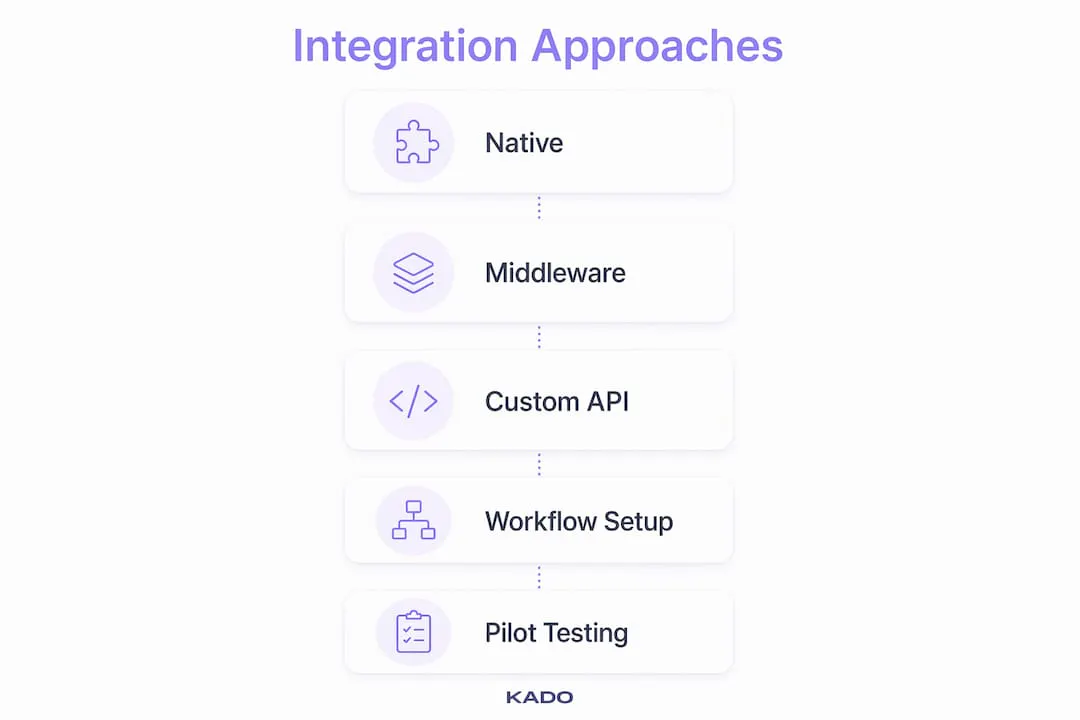
Native integrations are built directly into the CRM or networking platform. They require minimal setup and typically offer the most reliable sync. Salesforce and HubSpot both offer native connectors for common business tools, and these connections tend to be more stable than custom builds.
Middleware tools sit between two platforms and translate data from one format to another. Zapier is the most widely known example. Middleware is flexible and works across many tool combinations, but middleware integrations can become brittle if left unmonitored. A broken zap or a failed API call can silently stop syncing data for days before anyone notices.
Custom API integrations give developers full control over what data moves, when, and in which direction. They require engineering resources but produce the most tailored result for complex enterprise workflows.
Sync direction matters as much as the method. Unidirectional sync pushes data one way, typically from a networking source into the CRM. Bidirectional sync updates both systems when either one changes. For most professional use cases, bidirectional sync is the right choice because it prevents the two systems from drifting apart over time.
Key technical considerations when choosing an approach:
- Sync frequency: Real-time sync catches engagement signals immediately. Batch sync (hourly or daily) works for lower-volume workflows.
- Field mapping: Define which networking fields map to which CRM fields before you connect anything. Mismatched fields create duplicate or incomplete records.
- Error monitoring: Set up alerts for failed syncs. Silent failures are the most dangerous because they create the illusion of a working integration.
- Data ownership: Confirm that your integration exports data you actually own and control, not just data you can view.
Pro Tip: For teams under 50 people, a middleware tool like Zapier with a well-designed workflow often outperforms a custom build. For enterprise teams with complex routing rules, invest in a native integration or a dedicated integration platform.
What are the key challenges when integrating CRM with networking?
The hardest part of CRM and networking integration is not technical. The real challenge is organizational alignment and getting departments to agree on unified lead definitions and processes. Sales, marketing, and operations often define a “qualified lead” differently, and an integration that feeds data into a CRM without resolving that disagreement creates noise, not clarity.
The silo effect persists even after technical integration. If sales and marketing teams do not share a common view of the pipeline, integrated data gets interpreted differently by each team. The fix is a shared data dictionary agreed upon before any tool is connected.
Platform lock-in is a risk that professionals underestimate. Relying solely on social networking platforms for contact data means your relationship history lives on someone else’s servers under someone else’s terms. Platforms change their data access policies, restrict API usage, or shut down features without warning. Owning your network data inside your CRM protects you from those disruptions.
Data rot happens when automated imports bring in contacts without a process for keeping them current. A contact imported from a networking event two years ago may have changed companies, roles, or contact details multiple times since then. Automation without a maintenance plan accelerates the problem.
Automation without a clean data strategy spreads messy data faster than manual entry ever could. A standardized tagging taxonomy is the foundation of effective CRM reporting. Without it, your lead scoring, segmentation, and reporting all produce unreliable results.
Common pitfalls to avoid:
- Connecting platforms before agreeing on field mapping and lead definitions
- Importing all contacts without filtering for relevance or quality
- Skipping error monitoring after setup
- Treating integration as a one-time project rather than an ongoing process
- Ignoring change management and assuming teams will adapt automatically
Pro Tip: Run a pilot integration with one team or one data source before rolling out company-wide. A small-scale test surfaces field mapping errors, sync failures, and process gaps before they affect your entire database.
How can professionals use CRM-networking integration for better lead generation?
The real value of integration shows up in how you engage contacts after the initial connection. Networking platforms serve as public identity sources, but your CRM stores the private relationship context that actually drives sales: meeting notes, conversation history, opportunity stage, and personal details that no public profile contains. That context layer is what separates a generic outreach message from one that lands.
A practical workflow looks like this:
- Capture the contact at the point of exchange, whether through a digital business card, a QR code scan, or a form submission at an event. KADO, for example, syncs captured contacts directly to Salesforce, HubSpot, Microsoft Dynamics, and other CRMs, removing the manual step entirely.
- Add relationship context immediately while the conversation is fresh. Notes on what you discussed, what problem they mentioned, and what follow-up you promised belong in the CRM record, not in a notebook or your memory.
- Trigger automated follow-up tasks based on the contact’s source or tag. A contact tagged “conference lead” can automatically generate a follow-up task for 48 hours after the event, assigned to the right team member.
- Use engagement history to personalize outreach. Real-time syncing of engagement signals enriches CRM records and enables outreach that references specific interactions rather than generic templates.
- Deduplicate before you send. Integrated systems often pull the same contact from multiple sources. A deduplication step before any outreach campaign prevents the embarrassment of sending the same message twice to the same person.
- Review and update records on a schedule. Set a quarterly reminder to audit contacts added through networking integrations. Remove contacts who have gone cold, update job titles, and re-score leads based on recent activity.
For professionals who attend events regularly, the benefits of professional networking multiply when every new contact lands in a CRM with context attached, rather than sitting in a stack of paper cards or an unread email thread. The integration turns a one-time meeting into a managed relationship.
Pro Tip: Tag every contact with their source at the point of capture (event name, date, and channel). That metadata lets you measure which networking activities actually produce pipeline, so you can invest more in what works.
Key takeaways
Integrating CRM with networking platforms is the most direct way to convert professional relationships into measurable pipeline, because it unifies data, automates follow-up, and gives every team member the context they need to engage effectively.
| Point | Details |
|---|---|
Integration accelerates sales cycles | Connected systems eliminate manual entry and deliver up to 30% faster sales cycles. |
Bidirectional sync prevents data rot | Native or bidirectional integrations keep records current on both sides automatically. |
Clean data strategy comes first | A standardized tagging taxonomy must exist before automation begins or messy data spreads. |
Organizational alignment is the real challenge | Agreeing on unified lead definitions across teams matters more than the technical setup. |
Context layer drives revenue | Storing private relationship notes in CRM, beyond what public profiles show, produces more effective outreach. |
What we’ve learned about integration after working with thousands of networkers
The professionals who get the most from CRM and networking integration are not the ones with the most sophisticated tech stack. They are the ones who treat integration as a process discipline, not a software project.
We have seen teams spend months selecting and configuring the perfect integration tool, then fail to agree on what a “lead” means before the first contact syncs. The technical work is the easy part. The hard work is getting sales, marketing, and operations to share a single definition of pipeline stages, contact quality, and follow-up responsibility.
The other pattern we notice consistently: professionals who own their network data inside a CRM outperform those who rely on social platforms alone. Platform lock-in is a real risk, and we have watched professionals lose years of relationship history when a platform changed its API terms or restricted data exports. Your CRM is the only place where that data is truly yours.
One more observation worth sharing: CRM integration is the prerequisite for effective AI adoption. Every AI-powered sales tool, from lead scoring to conversation intelligence, depends on the quality and completeness of the data it reads. A fragmented, unintegrated data environment limits what AI can do. A connected one multiplies it.
Start with clean data, agree on definitions, and choose an integration method that your team will actually maintain. The technology follows the process, not the other way around.
— KADO
How KADO supports your CRM and networking integration

KADO is built for professionals who need to capture contacts quickly and get them into their CRM without friction.
When you share a digital business card through KADO at an event or a meeting, the contact data flows directly into Salesforce, HubSpot, Microsoft Dynamics, or your preferred CRM through native integrations. You can add notes, tags, and follow-up reminders at the point of capture, so every new contact arrives in your CRM with context already attached. For teams managing high volumes of networking leads, KADO’s contact management tools provide a structured workflow from first exchange to qualified opportunity. If you want to measure which events and networking activities actually produce revenue, KADO’s event ROI tracking connects networking activity to pipeline outcomes in one place.
Frequently Asked Questions
How does integration support AI tools in sales?
AI-powered sales tools depend on complete, connected data to function accurately. CRM integration is the foundation that makes AI adoption effective, because fragmented data limits what any AI tool can analyze or predict.
How do I choose between native and middleware integrations?
Native integrations offer more reliability and require less maintenance. Middleware tools like Zapier offer flexibility across more platform combinations but need active monitoring to catch silent sync failures.
What are the biggest risks of CRM and networking integration?
The two biggest risks are platform lock-in, where your contact data lives on a third-party platform you do not control, and data rot, where automated imports bring in contacts without a process for keeping records current.
Why integrate CRM with networking platforms?
Integrating CRM with networking platforms removes data silos, automates lead capture, and gives sales teams the context they need to personalize outreach. Integrated systems report up to 30% faster sales cycles compared to manual processes.