Go back to list of posts
Capture Leads Fast: Digital Cards for Small Business That Sync to CRM
Last modified: September 14, 2026


Small businesses should adopt a managed digital business card platform with team controls rather than a basic free app. The reasons come down to real-time updates, better contact capture, CRM sync, and lower long-term costs than reprinting paper cards every time a phone number or title changes. Start today: create one shareable card and turn on at least two sharing channels, like QR code and Apple Wallet or NFC.
Digital business cards support multiple sharing channels, including QR codes, NFC, wallet passes, and email embeds, which small businesses should test before fully adopting. Switching to digital cards can eliminate reprint costs, ensure contact details stay current, and improve lead capture accuracy through instant CRM sync and tagging. Prioritize platforms that offer lead capture, CRM integration, branding controls, and security features; testing vCard exports on both iOS and Android is essential. Using templates, centralized controls, and automation streamlines team onboarding, brand consistency, and follow-up, saving time during event or referral workflows. For most small businesses, a hybrid approach with digital cards plus a small stock of printed cards for formal settings balances branding and practicality at scale.
What Is a Digital Business Card, and Which Type Fits Your Business? A digital business card is a mobile-friendly profile that replaces a printed card with a link, code, or tap that shares your contact details, company information, and social links instantly. It goes further than a static contact page or a LinkedIn profile because the recipient can save your information directly to their phone contacts, often without typing a single digit, and you can update the card the moment anything changes.
Digital business cards generally come in three formats: wallet-based, app-based, and NFC-enabled. Each fits a different kind of small-business interaction.
- Wallet-based cards live in Apple Wallet or Google Wallet. They require no app download on the recipient’s end, which makes them the most frictionless option for a quick handoff at a coffee shop meeting or a cold introduction.
- App-based cards run through a dedicated platform and typically include richer customization, team dashboards, and tracking. They fit businesses that care about branding consistency and want to see who opened or saved their card.
- NFC-enabled cards are physical cards, key tags, or stickers embedded with a chip that shares your profile the moment someone taps their phone against it. They work well at trade shows, retail counters, and any setting where a tactile exchange still matters.
The right choice depends on the meeting context more than personal preference. A real estate agent doing dozens of open-house introductions a week benefits from the tap-and-go speed of NFC. A consulting firm that wants every employee’s card to look identical and wants to track engagement leans toward an app-based platform. A solo bookkeeper who just wants something simple to text a new client might start with a wallet pass and nothing else. Most small businesses that scale past a handful of employees end up using two of the three formats side by side.
What ROI Can a Small Business Expect From Switching?
Small businesses that switch to digital cards save money on reprints and capture more usable contact data, and both effects compound the longer the card stays in use. A paper card becomes outdated the moment someone changes roles, updates a phone number, or rebrands a logo. A digital card updates instantly across every copy already shared, which means a card handed out eighteen months ago still shows current information today.
Pro Tip: Set a quarterly reminder to review your card’s links and job title, even though updates are instant. A stale meeting-booking link does more damage than an outdated logo.
The operational wins are the easiest to see:
- No reprint costs when a title, address, or phone number changes.
- Faster contact capture, since a scanned QR code or tapped NFC card saves a full vCard rather than requiring the recipient to type details manually.
- Fewer lost leads, because contacts saved directly to a phone or synced to a CRM don’t end up crumpled in a jacket pocket.
The revenue-side benefit shows up in follow-up rates enhanced by AI marketing tools. When a card includes lead-capture fields and tagging, a business development rep working a conference floor can tag every scan by event, interest level, or referral source on the spot, instead of trying to reconstruct context from a pile of cards after flying home. Platforms that combine lead-capture forms with CRM sync consistently cut the manual data entry that causes leads to go cold before anyone reaches out.
Two quick scenarios illustrate the math. A five-person sales team attending a three-day trade show that collects 200 contacts on paper typically loses a meaningful chunk to illegible handwriting, lost cards, or delayed entry. The same team using QR-based capture with automatic tagging can move every contact into a CRM the same day, with notes attached while the conversation is still fresh. In a one-on-one sales meeting, an NFC tap that immediately offers a meeting-booking link converts a warm conversation into a scheduled call before the prospect even leaves the room, something no paper card can do.
What Features Should Small Businesses Prioritize?
The feature list that actually matters for a small business is shorter than most platforms make it look. Before comparing options, run through this checklist in order of what affects daily use the most.
- Sharing channels. Confirm the platform supports QR codes, NFC, Apple Wallet and Google Wallet passes, a shareable link, and embedding in an email signature. A platform that only does one or two of these will force you onto a second tool eventually.
- Lead capture and contact management. Look for vCard export so recipients save your details in one tap, plus lead-capture forms, notes, tags, and follow-up reminders on your end. This is the difference between a digital card that just replaces paper and one that actually replaces a chunk of your CRM workflow.
- CRM and integration options. Check for native or Zapier-based connections to Salesforce, HubSpot, and Outlook or Google. Integration depth is one of the clearest differentiators between basic card makers and platforms built for teams.
- Team and branding controls. If you have more than one employee, you need centralized templates, admin roles, and the ability to lock certain brand elements (logo, colors, fonts) while letting individuals edit their own contact details.
- Security and privacy basics. Ask whether the platform supports data encryption, has a documented privacy policy for stored contact data, and, for anything enterprise-facing, whether it maintains SOC 2 or similar compliance documentation.
- Pricing model. Understand whether the plan charges per user, gates features into tiers, or charges a flat team rate, and map that against which features you’ll actually use.
Branding controls deserve extra weight here. Consistent branding across employee cards builds trust faster than almost any other design decision, because a prospect who meets three people from your company and sees three different card layouts notices the inconsistency, even if they can’t name what feels off.
Pro Tip: Test the vCard export before you commit to a platform. Have a colleague scan your test card and confirm the contact saves cleanly into both an iPhone and an Android device. A card that looks great but breaks on one operating system will cost you leads.
How Do You Create, Share, and Capture Contacts With a Digital Card?
Getting from zero to a fully working digital card takes less than an afternoon if you gather your assets first.
- Collect your fields and assets. Pull together a profile photo, company logo, job title, phone number, email, website, social links, and a meeting-booking link if you use one. Having these ready before you open any tool saves you from a half-finished card sitting untouched for a week.
- Pick your card type and platform. Match the format to how you actually meet people, as covered above. Most small businesses default to an app-based platform with wallet and NFC add-ons rather than choosing just one format.
- Build the card and set branding. Upload your logo, choose your template, and apply consistent colors if you’re doing this for more than one employee.
- Set up sharing channels. Activate the QR code, generate the wallet pass, and, if using physical NFC cards, order and program them. Then test everything yourself: scan your own QR code, tap your own NFC card, and confirm the contact saves correctly into your phone.
- Enable lead capture. Turn on a capture form so people can share their details back to you, and set up at least one basic follow-up automation, even something as simple as an auto-reply thanking them for connecting.
- Onboard your team. For a team of one to ten people, distribute a standardized template so every card matches, then let each person fill in their individual details. This is also the moment to assign admin roles if your platform supports them.
- Track engagement and adjust. Watch scan counts and save rates over the first month. If a particular channel (say, NFC cards at your storefront) isn’t getting used, move that effort elsewhere.
A few things to double check along the way:
- Test on both iOS and Android before handing cards out at an event.
- Confirm your meeting-booking link actually opens correctly from the card, not just from your website.
- If you’re syncing to a CRM, run one test contact through the full pipeline before your first real event.
KADO’s step-by-step card creation guide walks through this same sequence with screenshots if you want a visual reference while setting up your first card.
What Do Real Small Business Workflows Look Like?
Four workflows cover most of what a small business actually needs from a digital card, and each one is easy to copy.
Trade show workflow: Print a QR code on your event badge or table sign. Attendees scan it, which opens your card and a short capture form asking for their name and interest area. Tag each submission by event name (e.g., “TradeShowSpring2026”) and interest, then trigger an automated thank-you email within an hour of the scan.
In-person sales meeting workflow: Tap your NFC card against the prospect’s phone at the start or end of the conversation. The tap should immediately offer both a vCard save and your meeting-booking link, so scheduling a follow-up call happens before you’ve even left the table.
Referral workflow: Include your card link directly in partner or referral emails instead of a static signature block. Tag every contact who comes through that link with the referral source (e.g., “ReferralJaneSmith”) so you can measure which partnerships actually produce business.
Remote networking workflow: Add your card link to your LinkedIn profile and email signature. This turns every cold email and every profile view into a potential contact capture, without any extra effort on your part.
- Sample follow-up template: “Great meeting you at [event]. I’ve added your details, here’s a link to grab 15 minutes on my calendar: [link].”
- Tag naming suggestion: pair an event or source tag with a priority level, like “TradeShowSpring2026 + HighPriority”, so your team can sort follow-ups fast.
Pro Tip: Assign one consistent tag structure across your whole team before your first event. If one rep tags by city and another tags by industry, your CRM reports will be unreadable in a month.
For a deeper breakdown of event-specific setups, KADO’s guide on using digital business cards at networking events covers badge placement and staffing tips for booths.
What Does It Cost, and What Should Launch Day Look Like?
Pricing generally splits into three shapes: per-user monthly fees, feature-gated tiers (free for basics, paid for analytics or wallet integration), and flat enterprise pricing for larger teams. Most digital card makers offer a free tier that covers basic card creation and sharing, then reserve team management, CRM sync, and analytics for paid plans. For a small business, the features usually worth paying for are CRM integration, admin controls across multiple employees, and engagement analytics that show which contacts actually opened your card.
A rough cost range for a five- to twenty-five-person business typically falls into a modest monthly per-seat rate for standard plans, with team or enterprise pricing scaling based on how many admin and analytics features you need. Exact figures vary enough by provider that it’s worth requesting a quote based on your headcount rather than assuming a flat number.
| Business size | Typical priority | Feature that justifies upgrading |
|---|---|---|
1 to 4 people | Simple sharing, low cost | Wallet pass and QR code support |
5 to 10 people | Consistent branding, follow-up tracking | Team templates and CRM sync |
More than 10 people | Governance and reporting | Admin roles and engagement analytics |
Launch checklist:
- Confirm vCard export works on both iOS and Android.
- Set up at least one CRM integration before your first event, not after.
- Assign a tag naming convention across the whole team.
- Order NFC cards early. Physical hardware takes longer to arrive than any software setup.
- Schedule a 30-day check-in to review scan and save data.
How Centralized Card Management Speeds Up Follow-Up
Templates and admin controls do more than keep a logo consistent. They cut the time a new hire spends figuring out how to represent the company correctly, since the card format is already decided for them and they only need to fill in personal details.
- Standardized templates mean every employee’s card matches on day one, with no design decisions left to chance.
- Admin controls let a manager lock brand elements while still letting individuals control their own contact fields.
- Lead-capture fields, notes, and tags attached to each saved contact give a follow-up rep everything they need without digging through old emails.
- CRM sync moves captured contacts into existing sales pipelines automatically, cutting the manual entry that causes leads to sit untouched for days.
Some platforms are built around this exact combination of centralized branding and lead-capture workflows, and it’s worth pulling real case study data and internal engagement metrics into this section once available, alongside a client testimonial on time saved during onboarding.
What Goes Wrong When Small Businesses Switch, and How Do You Fix It?
The most common failure point isn’t the technology. It’s inconsistent adoption. If half your team switches to digital cards while the other half keeps handing out old paper stock, you end up with a mixed impression that undercuts the branding consistency you were trying to build in the first place. Fix this by setting a hard cutover date and collecting old paper stock the same week new cards go live.
A second common issue is recipients who aren’t sure how to save a shared card, especially older clients less familiar with QR codes. Add a one-line instruction on your card or badge (“Scan to save my contact instantly”) so nobody has to guess what to do with the code.
Connectivity gaps cause the third major headache. NFC taps and QR scans both require the recipient’s phone to have a working connection, which can fail inside a crowded convention hall or a basement venue. Always carry a backup: a printed QR code on paper works even when your phone’s screen won’t load, and a shareable link sent by text covers you when NFC hardware misbehaves.
Finally, teams sometimes skip the CRM integration step during initial setup because it feels optional, only to end up manually re-entering weeks of contacts later. Treat CRM connection as a launch-day requirement, not a nice-to-have you’ll get to eventually.
What Legal and Privacy Rules Apply to Contact Data You Collect?
Collecting a name, email, or phone number through a lead-capture form counts as gathering personal data, and that means the same general privacy obligations apply as with any other data collection, whether it’s a paper sign-up sheet or a digital form. If you operate in the United States, your obligations depend on your state and industry, and rules like California’s Consumer Privacy Act apply broadly if you handle California residents’ data, regardless of where your business is based.
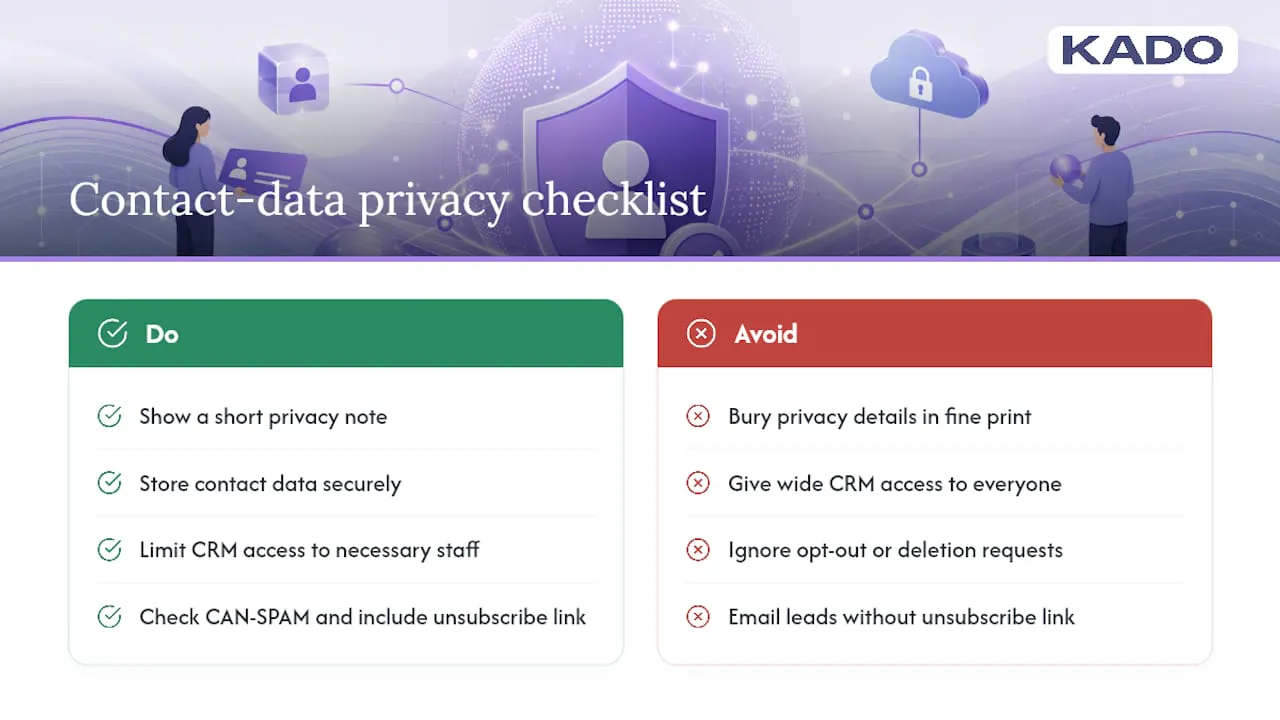
Practically, three habits keep a small business on solid ground. First, be transparent about what you collect and why, ideally with a short privacy note near your capture form rather than burying it in fine print nobody reads. Second, store captured contact data securely and limit who on your team can access it, especially once you’re syncing to a shared CRM. Third, honor opt-out or deletion requests promptly if someone asks you to remove their information.
If you plan to email captured leads for marketing purposes rather than a one-time follow-up, check whether your outreach needs to comply with CAN-SPAM requirements, including a working unsubscribe link. None of this is unique to digital cards. It’s the same due diligence any business collecting contact information should already be doing, just applied to a faster, higher-volume capture method.
When Should You Keep Print or Pair Digital With Physical Cards?
Digital cards outperform paper on nearly every practical measure, but a few settings still call for a physical card. Formal introductions in some industries, like white-glove real estate or high-end legal services, sometimes benefit from the tactile weight of a printed card, and Vistaprint’s own guidance acknowledges that a high-quality printed card can still leave a stronger impression in those specific moments.
The practical answer for most small businesses is a hybrid: carry a small stock of printed cards with a QR code on the back, so a formal handoff still feels traditional while the actual contact save happens digitally. Pair that with a wallet pass for casual exchanges and NFC for high-volume events. If your priority is a quick exchange, lean wallet. If it’s a branded experience, lean app-based with templates. If it’s lead capture at scale, lean NFC plus a capture form.
KADO for Small Businesses: Templates, Lead Capture, and CRM Sync in One Place
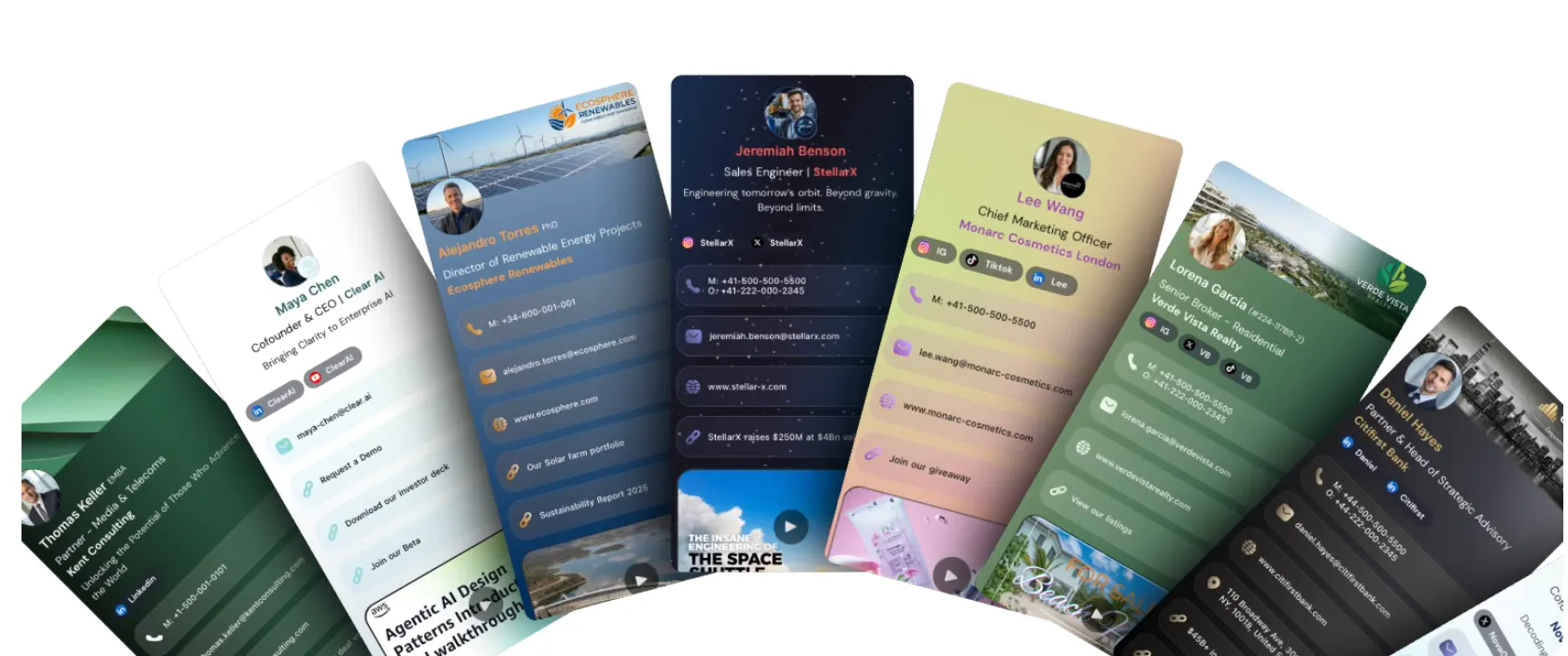
Certain platforms give small teams a way to standardize card design once and let every employee stay on-brand without a design request for every new hire. That single fix removes the branding drift that trips up growing teams the most.
Beyond templates, KADO includes lead-capture forms, contact tags, notes, and follow-up reminders that attach directly to each saved contact, plus CRM integrations with tools like Salesforce, HubSpot, and Outlook or Google to move captured leads into your existing sales workflow without manual re-entry. The contact management tools page covers how tagging and CRM sync work together in practice, and the event ROI tracking page breaks down how to measure what a trade show or conference actually returned in new contacts and follow-ups.
If your business is weighing whether to formalize digital cards across a team, start by creating a free account and building one card for yourself. Test the sharing channels, check how a captured lead flows into your CRM, and decide from there whether a team plan makes sense for your size.
Sources
Frequently Asked Questions
Which Digital Business Card Is Best for a Small Business?
The best option depends on your workflow, but a platform combining wallet, NFC, and app-based sharing with team templates and CRM sync, like KADO, covers the widest range of small-business use cases without forcing you to pick just one format.
What’s the Best Free Digital Business Card Option?
Free tiers from most card makers cover basic card creation and simple sharing, which works fine for testing the concept, but team management and analytics typically require a paid plan once you have more than one or two employees.
How Much Does a Digital Business Card Cost?
Costs vary by provider and typically follow a per-user monthly rate or feature-gated tiers, with basic sharing often free and advanced features like CRM sync and analytics priced into paid plans. Request a quote based on your team size rather than assuming a flat rate.
Are Digital Business Cards Worth It for Small Businesses?
Yes, for most small businesses. They eliminate reprint costs, speed up contact capture through instant vCard saves, and, when paired with tagging and CRM sync, noticeably improve follow-up rates compared to a stack of paper cards collected at an event.