Go back to list of posts
Team Digital Business Cards: A Rollout Playbook
Last modified: August 24, 2026


A centrally managed team digital business-card platform is the fastest way for sales and marketing teams to keep every rep on-brand, capture leads automatically, and never hand out a card with a wrong phone number again. If your team still orders paper cards through five different managers, or worse, through none, you already know the problem: reprints pile up, branding drifts, and nobody can say how many leads actually came from networking.
The short version: teams should adopt a platform when they hire in batches, run a recurring trade-show program, or go through a rebrand. Once you do, expect a few standard admin controls out of the box:
- Locked brand fields (logo, colors, fonts) that reps can’t edit
- Role-based permissions for who can create or approve cards
- Bulk import for onboarding new hires in one pass
- Usage analytics tied to individual cards and campaigns
One clear signal that this market has matured: buyers now evaluate these tools mainly on sharing options, CRM integration, analytics, and admin controls, not on novelty features. That’s the checklist worth building your evaluation around.
Key Takeaways
Centralized team digital business cards fix brand inconsistency and lead loss by combining locked templates, CRM sync, and real-time updates in one platform.
| Point | Details |
|---|---|
Paper fails at scale | Print cycles, decentralized ordering, and outdated info cause reprints and brand drift. |
Central dashboard is the fix | Locked templates and role-based permissions keep every card on-brand automatically. |
Rollout takes four stages | Design, import, pilot, and full launch typically span 5 to 6 weeks total. |
CRM sync converts exchanges | Salesforce, HubSpot, and Dynamics integrations turn card taps into trackable pipeline. |
KADO fits the team checklist | KADO offers templates, permissions, CRM integrations, and NFC and wallet sharing for teams. |
Why Traditional Paper Business Cards Break Down for Teams
Paper cards fail teams for three reasons: print cycles, decentralized ordering, and information that goes stale the moment someone changes roles.
Picture a mid-sized sales team. Someone gets promoted, a phone extension changes, or the company updates its logo. Every one of those cards is now wrong, and nobody notifies the print vendor until a rep runs out mid-quarter. Multiply that across regional offices ordering from different print shops, and you get business cards with three different logo versions floating around at the same industry conference.
The waste compounds. Boxes of outdated cards get tossed after a rebrand. New hires wait days or weeks for their first batch. And there’s no way to know whether any of those cards actually generated a follow-up conversation.
The failure points cluster around a handful of process gaps:
- Ordering: No single owner, so departments order independently and inconsistently.
- Approval: Brand guidelines exist on paper but nobody checks the print file against them.
- Distribution: Cards sit in a supply closet instead of reaching the person who needs them before a trip.
- Updates: A title change or new phone number means a full reprint, not an edit.
None of this is a people problem. It’s a structural one, and it only gets worse as the team grows.
How Team Digital Business Cards Fix This
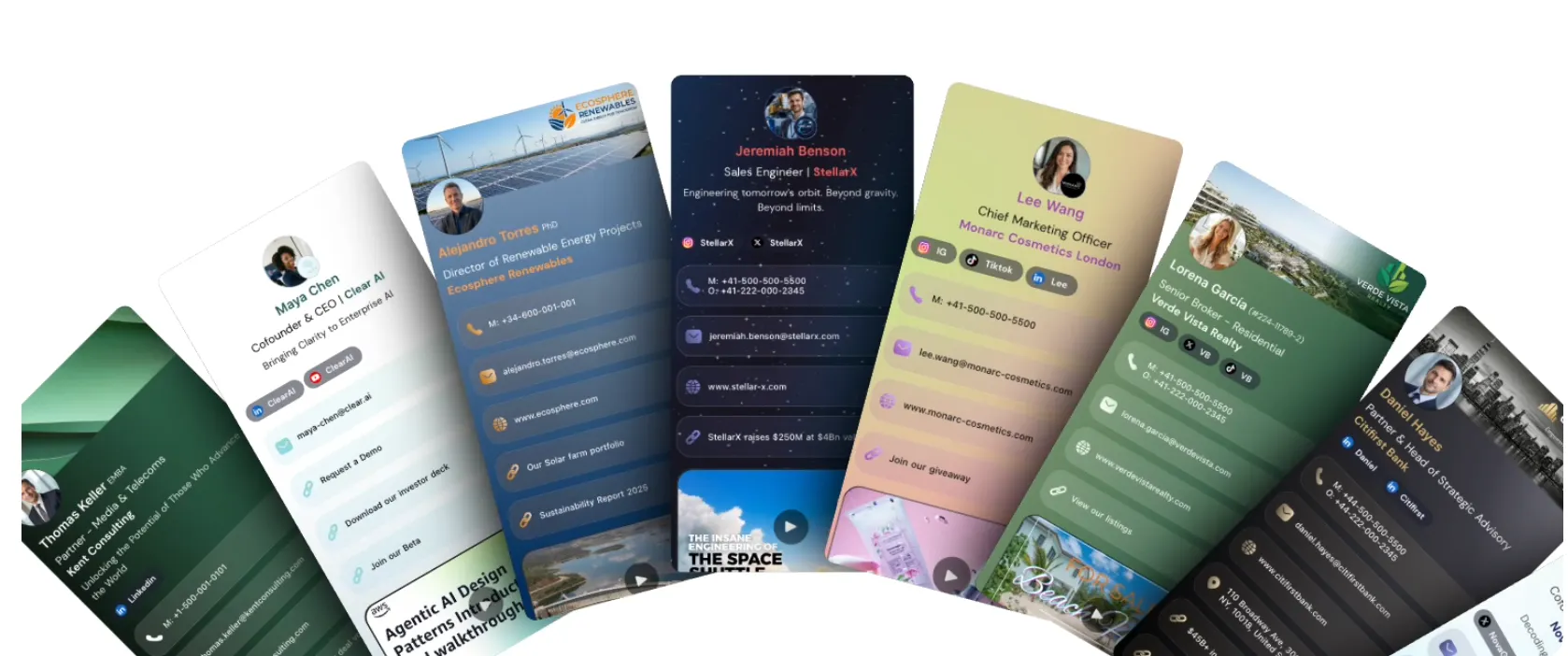
Centralized templates paired with admin controls solve the consistency problem directly: one person locks the brand elements, and every employee’s card inherits them automatically. Change the logo once, and it updates across every card in the organization instantly. No reprint, no waiting, no inconsistent versions circulating at the same event.
The practical benefits map cleanly to the pain points above:
- Brand consistency — locked template fields mean no rep can swap in an outdated logo or off-brand color.
- Faster onboarding — new hires get a live card the same day, not after a two-week print cycle.
- Zero reprints — a title or phone number change is an edit, not a purchase order.
- Immediate contact updates — everyone who already saved the card sees the new information right away.
KADO’s design guidance points out that real-time updates and branded landing pages are what separate a functional digital card from a static PDF replacement, and that distinction matters more than it sounds. A card that just mimics paper in digital form wastes the platform’s real advantage.
Pro Tip: Assign template ownership to one person, usually a brand or marketing manager, and give sales managers only approval rights on individual rep customization (job title, direct line, calendar link). Splitting create versus approve permissions prevents both brand drift and bottlenecks.
The mechanism that turns this from a nice-to-have into a pipeline tool is integration. Connect the platform to your CRM, Slack, or marketing automation system, and every card exchange becomes a trackable event instead of a business card sitting in someone’s blazer pocket.

Rolling Out a Team Card Program Step by Step
Rolling out a team digital business-card program typically involves stages like design, import, pilot, and full deployment, each with a clear owner.
- Design templates (1 to 2 weeks). Marketing builds the brand-locked template, including logo placement, color palette, and required fields. Get legal or brand approval before moving on.
- Bulk import team data quickly. Pull employee data from HR systems or a spreadsheet and import it in bulk rather than building cards one by one.
- Run a pilot (2 weeks). Roll out to one team, usually sales or a single office, and collect feedback on ease of sharing, template gaps, and CRM sync accuracy.
- Full rollout (2 to 4 weeks). Expand to the rest of the organization in phases, tied to training sessions and a communication plan so adoption doesn’t stall.
Checklist items worth tracking at each stage: branding sign-off, data cleanup before import (duplicate contacts, outdated titles), permission settings by role, and a short feedback survey after the pilot.
[VIDEO_EMBED: short walkthrough demo of template setup, bulk import, and card distribution]
During the pilot, track exchanges per rep, time to first share, and whether captured leads sync correctly to your CRM. Those three numbers tell you more about readiness for full rollout than any feature checklist.

What to Require From a Team Card Platform
Require five things at minimum: brand-locked templates, role-based permissions, bulk import or single sign-on, analytics, and CRM sync. Everything else is a nice-to-have.
- Locked template fields — prevent individual reps from overriding brand elements.
- Role-based permissions — separate who can edit templates from who can only personalize their own card.
- Bulk import and SSO — onboard many people quickly instead of one at a time.
- Analytics per card and per campaign — know which cards get shared and which sit unused.
- Audit logs — see who changed what, useful during compliance reviews or brand audits.
Before signing a contract, ask vendors directly about SOC 2 status, GDPR compliance for teams handling European contacts, and whether audit trails come standard or cost extra. These aren’t optional for enterprise procurement teams, and skipping the question early tends to surface expensive surprises later.
Pro Tip: Negotiate data retention terms and API access before signing, not after. Ask for a sandbox environment to test CRM sync with a small batch of real records before committing your whole team’s data.
G2’s category data shows an active market of platforms with user-rated capabilities across sharing, analytics, and admin features, which is useful context for building your own requirements list rather than picking the first vendor with a slick demo.
Sharing Formats: QR, NFC, Wallet, Link, and Email Signature
No single sharing format works for every situation, which is why a real team platform supports QR codes, NFC taps, Apple and Google Wallet passes, shareable links, and email signatures side by side.
Match the format to the scenario:
- QR codes work best at trade shows, printed on badges or signage where scanning replaces a paper exchange entirely.
- NFC cards suit field reps and one-on-one meetings, a single tap against a phone with no app required on the recipient’s end.
- Wallet passes (Apple and Google) keep the card accessible from a phone’s lock screen for repeat networking events.
- Shareable links fit remote outreach, cold emails, and LinkedIn messages where there’s no physical exchange at all.
- Email signatures turn every outgoing message into a passive networking touchpoint.
Combine channels for maximum reach. A recommended KADO setup puts QR on badges, NFC cards for field reps, and link-in-signature for remote outreach to cover events, in-person meetings, and digital-first outreach simultaneously. Recipients never need to download anything, which removes the single biggest friction point paper cards never had to worry about.
Turning Card Exchanges Into Pipeline
CRM sync and lead-capture forms are what convert a business card exchange into a trackable pipeline event instead of a name that disappears into someone’s contacts app.
The integrations that matter most fall into four categories:
- CRM platforms — Salesforce, HubSpot, and Microsoft Dynamics for direct contact and deal-stage sync.
- Automation connectors — Zapier and webhooks for routing leads into custom workflows.
- Analytics platforms — tracking share rates, view counts, and conversion by rep or campaign.
- Marketing automation — enrolling new contacts into nurture sequences automatically.
A workflow example: a rep shares their card at a conference, the recipient submits a lead-capture form, the contact auto-enriches with company data, routes to the right account owner, and a follow-up task lands on that rep’s calendar, all without manual entry. KADO’s recruiter-focused features describe similar note-taking, tagging, and follow-up reminder tools that keep this process organized after the initial exchange.
Here’s what typically flows into a CRM after a card interaction:
| Field | Example Value |
|---|---|
Contact name | Full name from the shared card or capture form |
Source | Event name or card ID |
Timestamp | Date and time of exchange |
Enrichment fields | Company, title, and industry pulled automatically |
G2’s lead-retrieval category confirms that buyers prioritize real-time capture and enrichment over manual data entry, which is exactly the gap CRM-synced cards close.
What Team Digital Business Cards Cost and How to Estimate ROI
Pricing for team digital business cards ranges from free individual tiers to per-seat monthly subscriptions, and the real budgeting exercise is comparing that per-user cost against what you currently spend on print and staff time.
Line items to plan for:
- Per-seat licensing versus bulk license packs for larger teams.
- Enterprise add-ons like SSO, API access, and advanced analytics, often priced separately.
- Hardware for NFC cards if your team wants physical taps alongside digital sharing.
- Implementation fees for larger rollouts that need custom onboarding support.
A simple ROI formula: (annual print and reorder costs eliminated) plus (estimated value of leads captured that would have been lost with paper) minus (annual subscription cost). If your team of 40 previously spent on quarterly reprints and lost track of half the leads from events because nobody logged them, the math tends to favor the platform quickly, especially once you factor in reduced onboarding time for new hires.
Think in ranges rather than fixed numbers when budgeting: small teams often fit into starter tiers with basic templates, while enterprise deployments with SSO and compliance needs sit in a higher bracket reflecting the added admin and integration work.
Launch Checklist and a 30/60/90-Day Measurement Plan
Pair your launch checklist with a 30/60/90-day measurement plan so you can prove impact before anyone asks whether the investment worked.
Before launch, confirm:
- Pilot group selected and briefed
- Training session scheduled
- Distribution method decided (bulk import plus individual invites)
- Internal communication sent explaining the switch
- Support contact designated for questions during rollout
| Timeframe | What to Measure |
|---|---|
30 days | Adoption rate across the pilot team |
60 days | Exchanges per rep and lead-capture form completions |
90 days | CRM conversion rate from card-sourced contacts |
Adjust based on early feedback. If exchanges per rep are low at 30 days, the problem is usually training or a sharing format mismatch, not the platform itself.
How KADO Supports These Team Workflows
KADO provides centralized templates, role-based permissions, CRM integrations, lead capture, and NFC and wallet sharing in one platform built around the checklist covered above.
- Brand-locked templates with admin controls that match the permissions and scaling needs of distributed teams
- Lead-capture forms and contact tools including notes, tags, and follow-up reminders
- Integrations with Salesforce, HubSpot, Microsoft Dynamics, Outlook, Google, and Zapier
- NFC compatibility, Apple and Google Wallet passes, and AI-powered paper card scanning for converting existing contacts
Sales teams use it to route event leads directly into CRM pipelines, recruiters use it to tag and follow up on candidate contacts, and event teams use it to measure exchange volume against booth traffic.
Why We Think Central Platforms Are Overdue, Not Optional
We’ve watched enough sales teams try to manage branding through a shared Google Doc and a print vendor’s email thread to know it doesn’t scale past a dozen people. The gap isn’t awareness, most teams know paper cards are inefficient. The gap is that nobody owns the fix until a rebrand or a compliance review forces the issue.
Pro Tip: If leadership is skeptical, don’t pitch the platform on brand consistency alone. Pitch it on CRM data quality. A messy CRM from manually entered business cards costs more in wasted follow-up than a subscription ever will.
Faster follow-up, cleaner CRM data, and consistent branding aren’t separate benefits. They’re the same outcome measured three different ways.
A Practical Next Step for Teams Ready to Switch
If your team is choosing between a DIY spreadsheet-and-print approach and a dedicated platform, KADO gives you the admin controls, CRM sync, and analytics this article just walked through, without asking every rep to manage their own card manually.
KADO’s team and enterprise solution covers brand-locked templates, bulk import, and role-based permissions out of the box, and its contact management tools handle the notes, tags, and follow-up reminders that keep captured leads from going cold. Teams running event programs can also connect card activity to event ROI measurement to see which conferences actually generate pipeline. Check the team plan details and request a walkthrough of the admin dashboard before your next hiring wave or trade show.
Sources
For broader market context, G2’s digital business card category and event lead-capture category pages are worth a look before you finalize requirements.
For implementation help, these KADO resources cover templates and design choices in more depth:
- Digital business card category | G2
These links are for context and further reading, not a vendor comparison.
Frequently Asked Questions
What is the most popular digital business card?
There’s no single dominant platform. G2’s digital business card category lists dozens of active vendors, and buyers typically choose based on CRM integration and admin controls rather than brand recognition alone.
Which digital business card is the best and most free?
Most platforms, including KADO, offer a free individual tier with basic sharing features, while team features like bulk import, permissions, and CRM sync usually require a paid plan.
How much does a digital business card cost for a team?
Costs range from free individual tiers to per-seat monthly subscriptions, with enterprise add-ons like SSO and API access priced separately. Estimate cost per user and compare it against your current print and staff time spend.
Are digital business cards worth it for teams?
Yes, for most teams larger than a handful of people. Eliminating reprint costs, cutting onboarding time, and syncing captured leads directly to a CRM typically outweighs a per-seat subscription within one to two quarters.