Torna alla lista dei post
Defining virtual networking: A professional's guide
Ultima modifica: May 19, 2026


TL;DR: Virtual networking in IT involves creating logical, software-defined network segments that operate independently of physical hardware, enabling scalable and secure communication. In professional contexts, it refers to using digital tools like e-business cards for instant, updateable, and trackable contact exchange, streamlining relationships. Understanding both meanings enhances strategic assessments of technology, security, and efficiency in modern networking practices.
The term defining virtual networking trips up professionals across industries every day. It means one thing to a cloud architect configuring software-defined networks in Azure, and something entirely different to a sales rep trying to exchange contact information at a trade show without carrying a stack of paper cards. This gap causes real friction: teams invest in the wrong tools, IT decisions get disconnected from business goals, and professionals miss faster, cleaner ways to build relationships. Getting the definition right is the first step toward modernizing how you manage contacts and build your network.
Key Takeaways
| Point | Details |
|---|---|
Dual meaning of virtual networking | Virtual networking refers both to IT infrastructure virtualization and professional online contact sharing. |
Network virtualization basics | It abstracts physical networks into software-defined logical segments for faster, secure provisioning. |
VPN role | VPNs provide encrypted remote access, securing virtual network communication over public internet. |
Digital business cards benefits | They enable instant, updateable, and richer sharing of contact information versus paper cards. |
Practical adoption tips | Choosing the right platforms and CRM integration ensures successful transition to virtual networking. |
What is virtual networking in IT and cloud environments?
At its core, virtual networking in IT means creating logical network segments without requiring dedicated physical hardware for each connection. Instead of running cables between servers or configuring physical switches, you define network behavior in software. The result is a flexible, programmable infrastructure that behaves like a traditional network but operates entirely in code.
Cloud platforms like Microsoft Azure demonstrate this clearly. When you set up a virtual network in Azure, you define an address space, create subnets, and attach security groups, all without touching a single physical cable. Resources inside that virtual network communicate securely and privately, isolated from other tenants on the same physical hardware.
Here is what the key constructs of a cloud virtual network typically include:
- Address space: The IP range assigned to the virtual network, defining its scope
- Subnets: Logical divisions within the address space for organizing resources
- Security groups: Rules controlling inbound and outbound traffic between resources
- Network gateways: Connections that link virtual networks to on-premises infrastructure or other networks
- Peering: The ability to connect multiple virtual networks as if they were one
This architecture gives IT teams digital card sharing benefits that mirror what professionals gain from digital contact tools: the ability to exchange, update, and manage information without being tied to physical artifacts.
Network virtualization: The technology behind virtual networking
Network virtualization is the foundational concept making all of this possible. The idea is straightforward: decouple network services from physical hardware by creating programmable logical constructs that can be provisioned, changed, or deleted through software. What once took a technician days to configure on physical switches can now be done in seconds.
The technology relies heavily on overlays, which are logical Layer 2 or Layer 3 networks built on top of an existing physical network. Encapsulation protocols like VXLAN wrap network traffic in additional headers, letting it travel across physical infrastructure while maintaining the appearance of a separate, isolated network. From the application’s perspective, it is operating on its own private network.
Key operational advantages include:
- Speed: New network segments go live in seconds, not days
- Security: Each logical segment is isolated, limiting lateral movement in a breach
- Agility: Network policies can be updated across all nodes from a single control point
- Consistency: Configuration is defined in code, reducing human error from manual setups
Software-defined networking (SDN) takes this further by separating the control plane (decisions about where traffic goes) from the data plane (the actual forwarding of traffic). This separation means a central controller can reprogram the entire network topology without touching individual devices.
Pro Tip: If your team relies on cloud infrastructure, understanding how your provider implements paperless networking efficiency through virtual networks helps you ask better questions about security segmentation and access controls during vendor evaluations.
How virtual private networks (VPNs) fit into virtual networking concepts
VPNs are the most familiar form of virtual networking for most professionals. They work by creating an encrypted tunnel between a device and a private network over public internet infrastructure. A remote access VPN authenticates the user first and then wraps all traffic in encryption, making it appear as if the device is physically present on the corporate network.
Here is how the connection process typically works:
- Authentication: The user provides credentials (and often a second factor) to verify their identity before the tunnel opens
- Tunnel establishment: The client and server negotiate encryption protocols and establish the secure tunnel
- Traffic encryption: All data sent between the device and the corporate network is encrypted end to end
- Resource access: The user can now access internal servers, files, and applications as if sitting at their office desk
- Session monitoring: IT teams can log and monitor VPN sessions for compliance and security purposes
VPNs are especially relevant for remote work tools setups where employees need to access internal CRMs, databases, or file systems from home or the field. A sales rep in a hotel can securely pull up client records, update deal stages, and sync contact data, all through the same encrypted tunnel a VPN provides.
The important distinction: a VPN extends access to an existing network, while network virtualization creates new networks entirely in software. Both are forms of virtual networking, but they solve different problems.
Virtual networking in professional contact management and digital business cards
Now we arrive at the second, equally valid meaning that professionals use daily. In the context of relationship building, virtual networking means exchanging professional information and building contacts through digital tools rather than physical ones. A digital business card is an online profile that shares your contact details and brand through links, QR codes, or NFC taps, enabling instant updates and richer networking than any paper card can offer.
This is where professionals like sales reps, recruiters, and real estate agents see the most immediate impact:
- Instant sharing: Send your card via link, QR scan, or NFC tap in under three seconds
- Always current: Update your phone number, title, or company once and every recipient sees the change automatically
- Richer profiles: Embed your portfolio, LinkedIn, scheduling link, and video introduction in a single card
- CRM-ready contacts: Capture leads directly into your pipeline without manual data entry
- Trackable engagement: See who viewed your card and when, giving you context before a follow-up call
Paper cards get misplaced within days. A digital card lives in someone’s phone contacts or email forever. For a recruiter managing hundreds of candidate touchpoints or a real estate agent working multiple open houses in a weekend, the time savings alone justify the switch. Explore digital business cards for professionals to see how different roles are using them to capture leads at scale.
Understanding virtual networking concepts in this context means recognizing that the technology underneath (cloud infrastructure, VPNs, encrypted storage) is what makes these tools reliable and secure enough to trust with your professional identity.

Comparing traditional networking with virtual networking tools for professionals
The gap between paper-based networking and digital virtual networking tools is wider than most professionals realize until they make the switch. Here is a direct comparison:
| Feature | Traditional paper cards | Digital virtual networking tools |
|---|---|---|
Sharing speed | Manual exchange, one at a time | Instant via QR, NFC, or link |
Information updates | Reprint required | Real-time edits, no reprinting |
Contact capture | Manual data entry into CRM | Auto-sync with CRM on capture |
Rich media | Text and logo only | Video, links, portfolios, booking |
Loss risk | High (physical item) | Zero (cloud-stored) |
Analytics | None | View tracking, engagement data |
Environmental impact | Paper waste per batch | Fully paperless |
Scalability | Cost scales with volume | Fixed cost regardless of volume |
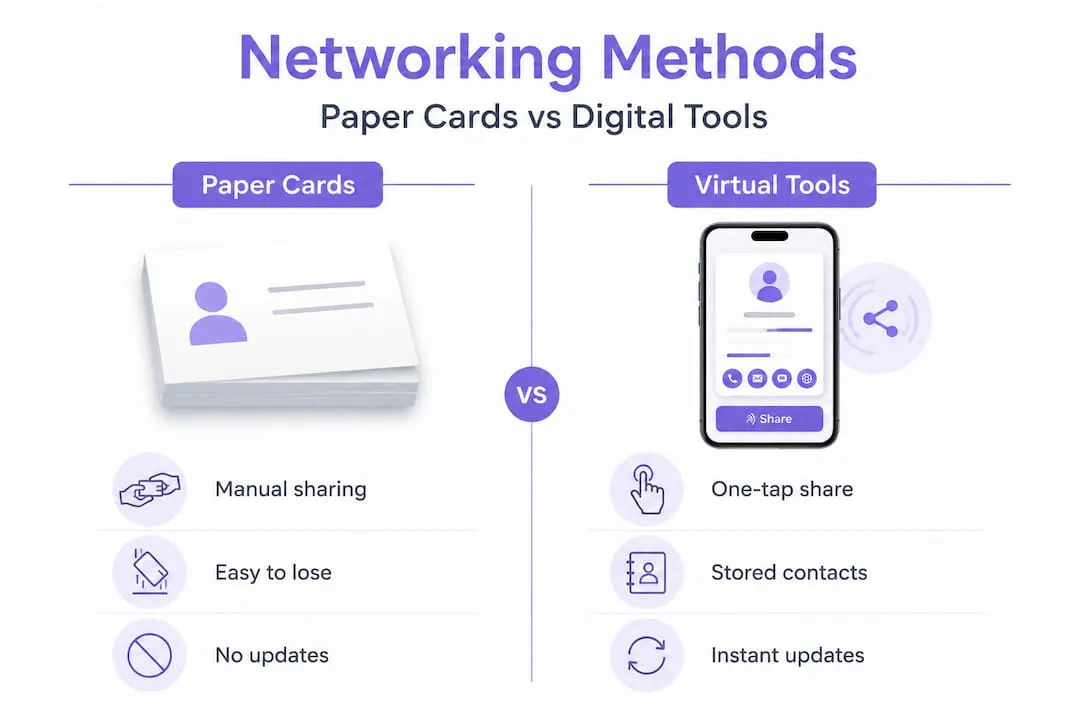
The CRM integration point deserves emphasis. Teams using CRM integration can capture new leads directly from digital cards instead of manual entry, enabling faster follow-up and more accurate records. For a sales team running 50 conversations at a conference, eliminating manual entry alone recovers hours of work.
Additional benefits of virtual networking tools for professionals include:
- ✅ No more carrying or running out of cards at events
- ✅ Consistent branding across every team member’s card
- ✅ Follow-up reminders triggered automatically from card scans
- ✅ Contact data that is clean, searchable, and CRM-ready from day one
Pro Tip: When evaluating platforms, check whether they let you streamline contacts directly into the CRM tools your team already uses. A card that captures leads but requires a manual export step is only half the solution. Look for enterprise growth benefits that include native integrations.
Practical tips for professionals to implement virtual networking and digital cards
Making the transition from traditional to digital networking does not require a complete technology overhaul. It requires a clear plan and consistent habits. Here is how to do it right:
- Choose a platform that supports multi-channel sharing. QR codes and NFC taps make it easy to exchange cards quickly at conferences and trade shows. Your platform needs to support both, plus shareable links for email and remote conversations.
- Connect your digital card platform to your CRM. Set up the integration before your next event so every scan automatically creates or updates a contact record. Zero manual entry from day one.
- Train your team on sharing technique. Run a 15-minute session before any conference showing the team exactly how to pull up their QR code, trigger an NFC tap, and send a link via text. Practice makes this feel natural fast.
- Build a card update habit. Assign a monthly reminder to review your card details. A title change or new phone number that goes uncorrected quietly erodes trust.
- Analyze your card engagement data. Most platforms show you who viewed your card, when, and what they clicked. Use this data to prioritize follow-ups and understand which events or channels drive the most contact activity.
Review our full digital cards guide to find platforms that meet all five criteria before committing.
Pro Tip: For real estate agents specifically, embedding a direct booking link into your digital card removes the friction of a follow-up scheduling email. A prospect scans your card at an open house and books a call in the same motion.
Rethinking virtual networking: Beyond buzzwords to strategic advantage
Here is something we do not see discussed often enough: the professionals who get the most out of virtual networking tools are the ones who understand both meanings of the term, not just the professional contact-sharing side.
Because the phrase “virtual networking” is ambiguous, experts often clarify whether they mean IT infrastructure or professional online networking, and mixing the two causes real confusion in team meetings and vendor evaluations. But we would argue the confusion itself is hiding an opportunity.
When you understand that your digital business card platform runs on the same types of virtual networks we described earlier — cloud infrastructure, encrypted tunnels, software-defined access controls — you become a far more informed buyer. You start asking questions like: How is my contact data encrypted? Where is it stored? What happens to my leads if the platform goes offline? These are IT virtualization questions applied to professional networking tools, and most users never think to ask them.
We have seen teams at the enterprise level lose trust in a digital card platform precisely because no one on the procurement team understood the underlying network security model. They bought based on features and ignored infrastructure. Understanding virtual networking concepts holistically closes that blind spot.
The other advantage: teams that see virtual networking as both a software-defined infrastructure concept and a digital contact exchange strategy build workflows that actually hold together. They integrate their digital cards into their CRM, which sits inside a secure cloud environment, which connects back to their office systems via VPN. Every layer of that stack is a form of virtual networking. Knowing that helps you design a contact management system that is both user-friendly and genuinely secure.
Explore professional networking clarity if you want to understand where the boundaries of professional networking sit and how to focus your efforts accordingly.
Streamline your virtual networking with KADO Networks
Understanding virtual networking is one thing. Having the right tools to act on that knowledge is another. KADO Networks gives sales reps, recruiters, real estate agents, and enterprise teams a complete platform for creating and sharing digital business cards via QR codes, NFC, and links. Setup takes minutes, and every card is fully brandable with embedded media, contact capture forms, and scheduling links.
KADO’s contact management solutions connect directly with leading CRMs, so every scan turns into a tracked lead without manual entry. The relationship management platform helps teams stay on top of follow-ups and organize contacts at scale. For event-heavy professionals, the event ROI measurement tools show exactly which interactions are generating pipeline. If you are ready to replace paper cards with a networking system that actually works, KADO is built for exactly that.
Domande Frequenti
What does virtual networking mean in IT?
In IT, virtual networking means creating software-defined, logical network segments that operate independently of physical hardware to enable scalable, secure communication among resources.
How do digital business cards improve professional networking?
Digital business cards enable instant sharing, easy updates, and richer contact details like social links and portfolios, making networking more efficient and trackable than traditional paper cards.
Why is network virtualization important for businesses?
Network virtualization creates programmable logical networks that can be provisioned in seconds, giving businesses faster deployment, better security segmentation, and programmatic control over their infrastructure.
How does a remote access VPN secure virtual networking?
A remote access VPN creates an encrypted tunnel between a remote user and the corporate network, authenticating the user and protecting all data in transit over public internet connections.
Can virtual networking replace traditional face-to-face networking?
Virtual networking complements rather than replaces in-person networking. QR codes and NFC taps make digital card exchange fast and natural even in busy, in-person settings like conferences and trade shows.