Volver a la lista de publicaciones
Mejores tarjetas de visita digitales para equipos en 2026
Última modificación: March 11, 2026


Gestionar una tarjeta de visita digital es sencillo. Gestionar las tarjetas de todo un equipo no lo es.
Cuando se supera el uso individual, aparecen nuevos problemas: branding inconsistente, empleados que editan plantillas, leads perdidos almacenados en teléfonos personales, falta de visibilidad del rendimiento y ausencia de control cuando alguien deja la empresa. Lo que funciona para un freelancer suele dejar de funcionar a nivel de equipo.
Por eso esta guía es diferente.
No probamos estas plataformas como usuarios individuales. Evaluamos KADO, Popl, Blinq, HiHello, Wave y Mobilo específicamente desde la perspectiva de equipos, centrándonos en controles de administración, control del branding, integraciones CRM, analíticas y escalabilidad.
Este artículo no clasifica las herramientas según su popularidad. En su lugar, analizamos qué plataformas están realmente estructuradas para equipos y cuáles son simplemente herramientas individuales con una etiqueta de “team” añadida.
Si estás eligiendo una plataforma de tarjetas de visita digitales para tu equipo, esta guía te ayudará a decidir en función de gobernanza, visibilidad y escalabilidad a largo plazo.
Qué hace que una tarjeta de visita digital sea “la mejor” para equipos en 2026
Al evaluar tarjetas de visita digitales para equipos, los criterios cambian. Ya no se trata de preferencias personales, sino de gobernanza, consistencia y control.
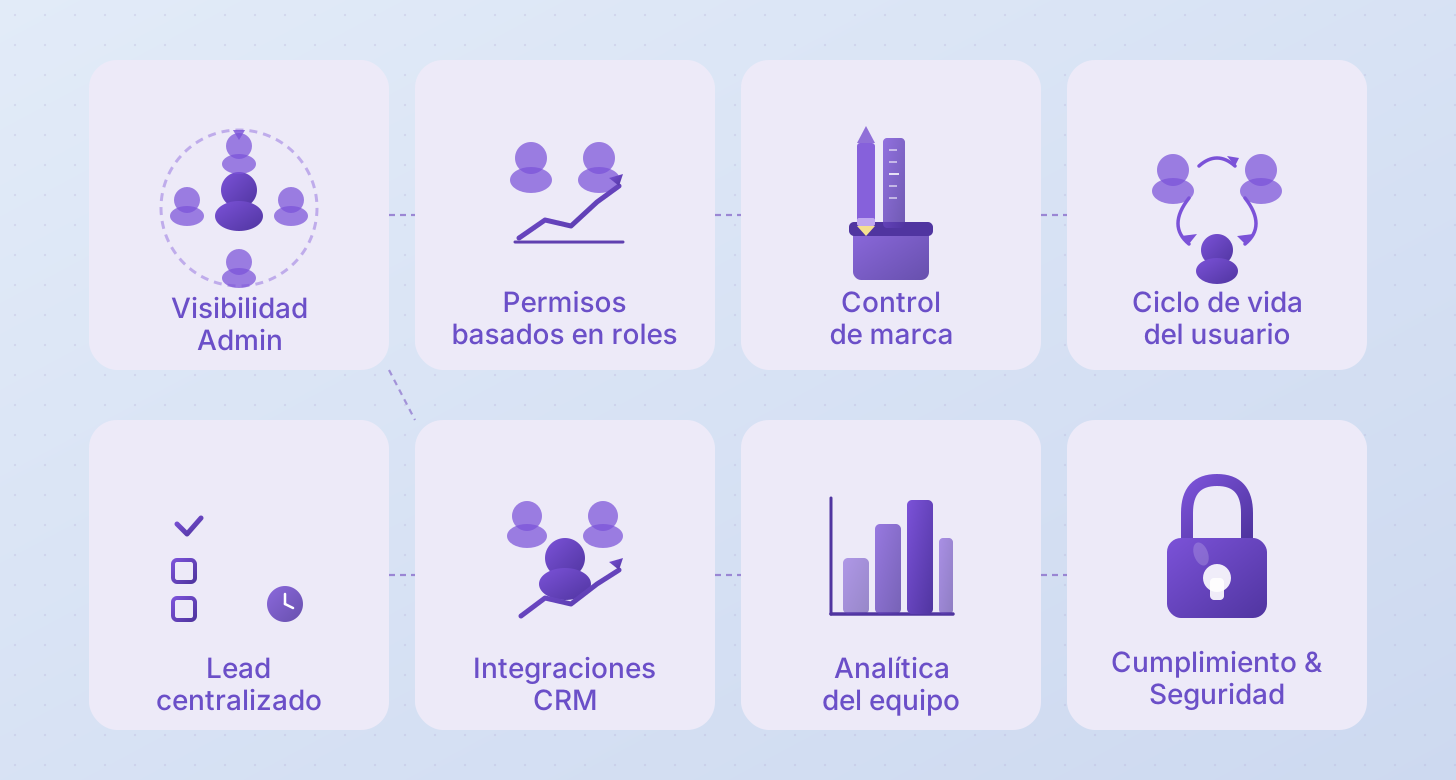
A continuación se muestran los requisitos mínimos que una plataforma debe cumplir para considerarse preparada para equipos:
| Criterios de evaluación | Qué significa para los equipos |
|---|---|
Visibilidad administrativa | Supervisión centralizada de todos los miembros del equipo, tarjetas y actividad |
Permisos basados en roles | Control claro sobre quién puede editar el branding, gestionar usuarios o acceder a las analíticas |
Control de marca | Capacidad de bloquear logotipos, colores, plantillas y campos clave para mantener la coherencia |
Gestión del ciclo de vida de los usuarios | Incorporación sencilla, salida de usuarios y revocación de accesos cuando los empleados se unen o dejan la empresa |
Almacenamiento centralizado de leads | Los contactos no quedan atrapados en dispositivos personales, sino que son accesibles a nivel de equipo |
Integraciones CRM | Sincronización directa con herramientas como Salesforce, HubSpot o Dynamics para evitar la introducción manual de datos |
Analíticas del equipo | Visibilidad sobre el uso del equipo, el engagement y las métricas de rendimiento |
Capacidad offline | Compartición fiable mediante QR o contacto incluso sin acceso a internet |
Cumplimiento y seguridad | Cumplimiento del GDPR, certificación SOC 2 y estándares adecuados de gestión de datos |
Escalabilidad | Funciona eficazmente desde 5 usuarios hasta más de 100 sin fricción operativa |
Una tabla comparativa
Antes de pasar a revisar las mejores opciones disponibles, aquí tienes una comparación lado a lado. Probamos personalmente cada proveedor a continuación utilizando los mismos criterios de evaluación mencionados anteriormente — sin suposiciones, sin resúmenes de sitios de reseñas, solo experiencia práctica directa.
| Categoría | Capacidad | KADO | Blinq | Popl | Wave |
|---|---|---|---|---|---|
Governance | Admin Visibility | ✅ ⭐️ Alto | ✅ Sí | ⚠️ Limitado | ✅ Sí |
Permisos de rol | ✅ ⭐️ Alto | ✅ ⭐️ Alto | ✅ Sí | ✅ Sí | |
Control de marca | ✅ ⭐️ Alto | ⚠️ Limitado | ⚠️ Limitado | ✅ ⭐️ Alto | |
Control del ciclo de vida de los usuarios | ✅ Sí | ✅ Sí | ⚠️ Limitado | ✅ Sí | |
CRM & Data | Native CRM Integrations | ✅ Sí | ✅ ⭐️ Alto | ✅ Sí | ✅ Sí |
Centralized Lead Storage | ✅ Sí | ✅ Sí | ⚠️ Limitado | ✅ Sí | |
Team Analytics | ✅ ⭐️ Alto | ⚠️ Limitado | ⚠️ Limitado | ⚠️ Limitado | |
✅ Sí | ⚠️ Limitado | ✅ Sí | ❌ No | ||
Fondos virtuales | ✅ Sí | ❌ No | ✅ Sí | ❌ No | |
AI scanner (QR, badges, paper cards) | ✅ ⭐️ Alto | ⚠️ Limitado | ✅ Sí | ⚠️ Limitado | |
Operativo | Soporte offline | ✅ Sí | ✅ Sí | ✅ Sí | ✅ Sí |
Integración HRM | ✅ Sí | ❌ No | ✅ Sí | ❌ No | |
Cumplimiento (GDPR + SOC 2) | ✅ Sí | ✅ Sí | ✅ Sí | ✅ Sí | |
Hardware | Venta de tarjetas NFC | ⚠️ Limitado ( Under demand) | ✅ Sí | ✅ Sí | ✅ Sí |
Usabilidad | Facilidad de uso de la plataforma (configuración → uso diario) | 🟢 Fácil | 🟢 Fácil | 🟠 Medio | 🟢 Fácil |
Pricing | Free Plan | ✅ Sí | ✅ Sí | ✅ Sí | ✅ Sí |
Paid Plans | Networker (Individual / Team): $ 2.5 / Mo / pp | Premium: $9.99 / Mo or $88.68 / Year | Pro: $2.99 / Mo | Pro: $9 / Mo or $84 / Year |
Mejores opciones de tarjetas de visita digitales para equipos en 2026 — Probadas y analizadas
KADO
Visión general de la experiencia
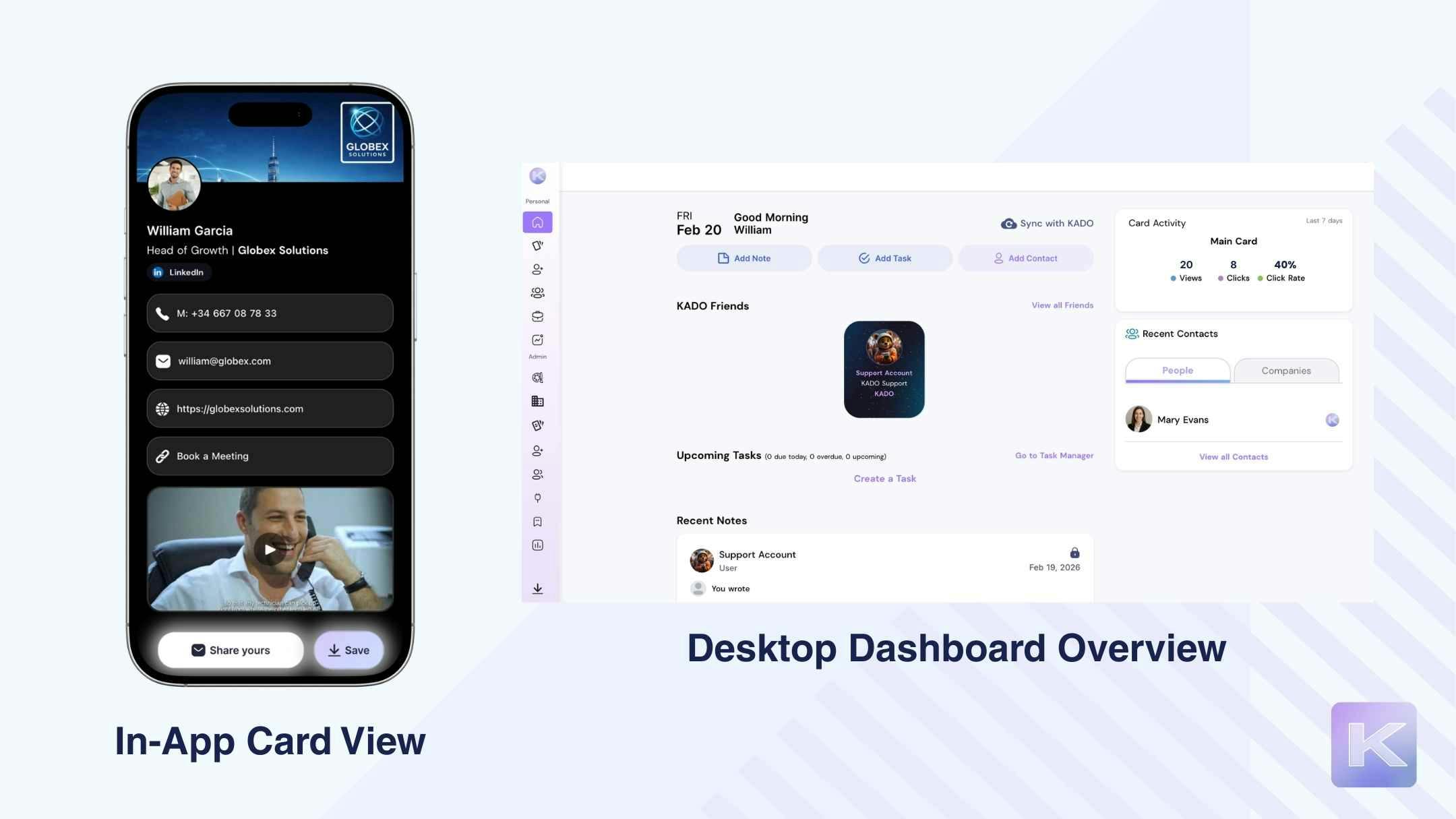
Desde la perspectiva de un equipo, KADO parece diseñado intencionalmente para entornos estructurados, no solo para el intercambio individual. La configuración administrativa se gestiona de forma clara desde el panel de control, donde roles, permisos y controles de marca pueden definirse desde el primer día. Es posible estandarizar logotipos, colores y diseños, e incluso utilizar plantillas animadas que hacen que las tarjetas del equipo sean visualmente coherentes pero aún distintivas. La flexibilidad del branding destaca — se siente profesional, no genérico.
La compartición funciona de forma fiable mediante códigos QR online y offline, Wallet, NFC, firmas de correo electrónico, widgets y enlaces directos. La captura de leads es donde la plataforma se vuelve más potente para los equipos: el escáner de IA captura tarjetas de visita en papel, credenciales y códigos QR directamente en el sistema, y los formularios bidireccionales aseguran que los contactos no se pierdan.
Después del intercambio, notas, etiquetas, tareas, analíticas (móvil + escritorio) e integraciones CRM convierten los leads capturados en datos accionables, no solo en contactos guardados.
| Fortalezas | Limitaciones según los criterios |
|---|---|
❌ La gobernanza avanzada y las integraciones CRM requieren planes de pago | |
✅ Controles de marca con bloqueo de plantillas y estándares centralizados | ❌ La configuración estructurada puede resultar más compleja de lo necesario para equipos muy pequeños e informales |
✅ Opciones de branding distintivas y de alto impacto (colores personalizados, degradados, plantillas animadas) | ❌ Algunas integraciones requieren tiempo de configuración durante la implementación inicial |
✅ Almacenamiento centralizado de leads los contactos no quedan atrapados en dispositivos individuales | |
✅ Escáner de IA para tarjetas de visita en papel, credenciales y códigos QR | |
✅ Captura bidireccional de contactos con notificaciones instantáneas | |
✅ Notas, etiquetas y creación de tareas integradas | |
✅ Analíticas en móvil y escritorio (vistas, clics, datos de engagement) | |
✅ Cumplimiento del GDPR y certificación SOC 2 |
Resumen de precios
KADO ofrece planes preparados para equipos sin requerir contratos de nivel enterprise desde el principio. Ambos niveles de pago admiten usuarios individuales y equipos, con funciones de gobernanza y colaboración que pueden escalar según sea necesario.
Networker: 2,5 $ / usuario / mes
Business Developer: 4 $ / usuario / mes
Enterprise: Contactar con ventas
El plan Business Developer desbloquea integraciones CRM más profundas, analíticas ampliadas y controles de equipo mejorados, lo que lo convierte en el nivel más relevante para equipos estructurados de ventas y crecimiento.
Casos de uso ideales
KADO es más adecuado para equipos de ventas, equipos de desarrollo de negocio y startups en crecimiento que necesitan más que solo compartir tarjetas.
Funciona especialmente bien para equipos que:
- necesitan visibilidad centralizada de leads en lugar de contactos guardados en teléfonos personales
- requieren consistencia de marca en todos los miembros del equipo
- dependen de integraciones CRM para evitar la entrada manual de datos
- quieren seguimiento estructurado con notas, etiquetas y tareas
- trabajan en eventos o sobre el terreno y se benefician del escaneo con IA de credenciales y tarjetas de visita
También es una buena opción para equipos que planean escalar de unos pocos miembros a decenas sin tener que cambiar de herramienta más adelante.
Popl
Visión general de la experiencia
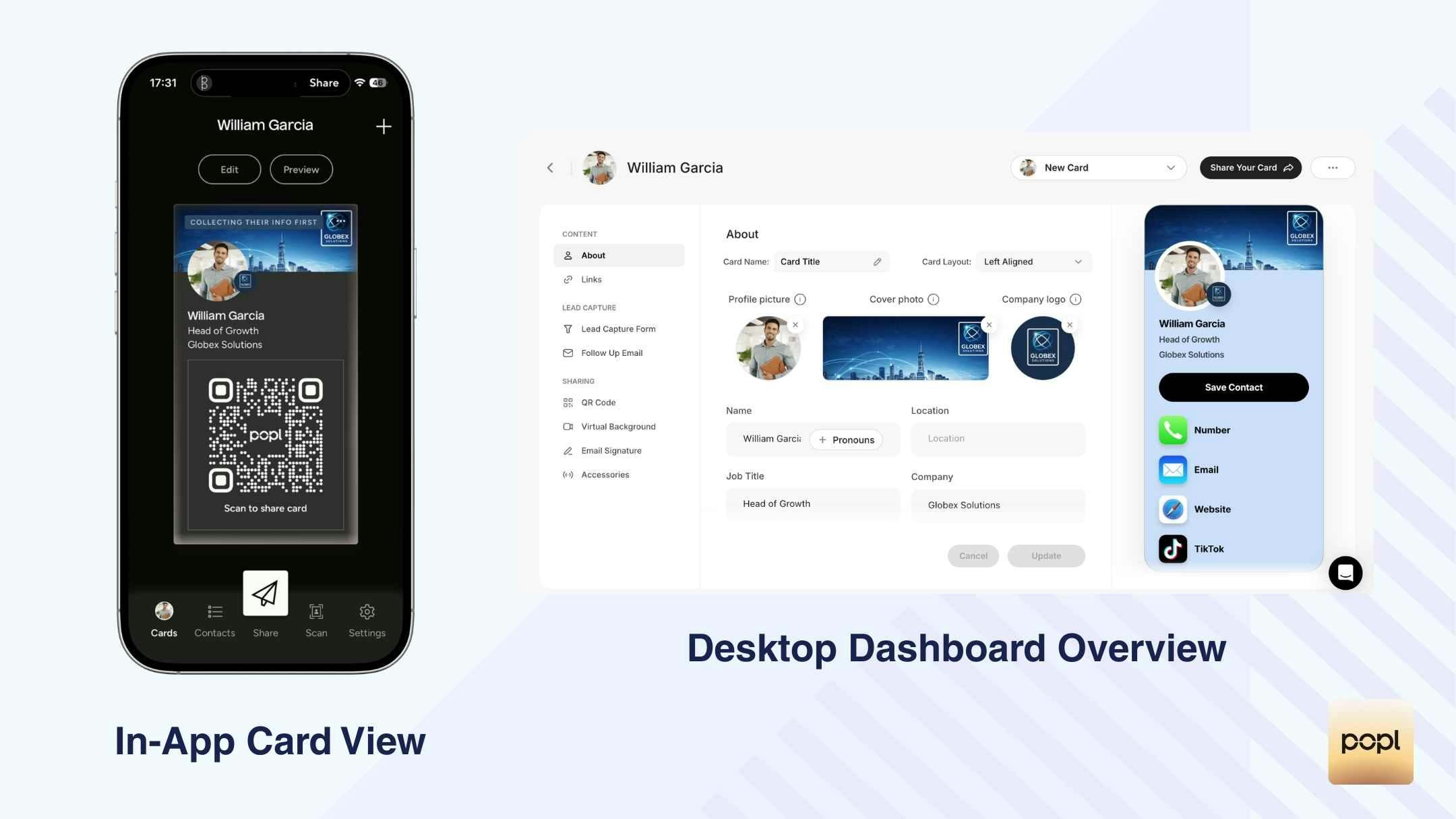
Desde la perspectiva de los equipos, Popl ofrece funcionalidades estructuradas, pero la mayoría de las capacidades avanzadas están vinculadas a planes de pago y a la gestión desde escritorio. Los roles del equipo (Full Admin, Subteam Admin, Member) permiten un control jerárquico, y las restricciones de plantillas ayudan a mantener cierto nivel de consistencia de marca entre los miembros. Sin embargo, gran parte de la gobernanza y la visibilidad de analíticas se encuentra en el panel de control de escritorio, en lugar de en la aplicación móvil.
La compartición es alta, con códigos QR online y offline, soporte para Wallet y múltiples opciones de enlaces. La captura de leads funciona de forma fiable mediante formularios y escaneo con IA de tarjetas de visita en papel y credenciales de eventos, aunque existen limitaciones en los planes inferiores. Los contactos están centralizados y pueden exportarse o sincronizarse con CRM como Salesforce y HubSpot, lo que respalda los flujos de trabajo de ventas.
Dicho esto, las analíticas son básicas y principalmente de alto nivel, y los flujos de seguimiento requieren herramientas CRM externas. Para los equipos, Popl funciona más como una herramienta estructurada de compartición con exportación a CRM, que como un sistema completamente integrado de activación y gestión de leads.
| Fortalezas | Limitaciones según los criterios |
|---|---|
✅ Jerarquía clara de roles (Full Admin, Subteam Admin, Member) | ❌ Las analíticas del equipo son básicas y solo están disponibles en escritorio |
✅ Restricciones de plantillas para mantener una consistencia básica de marca | ❌ No incluye un sistema integrado de tareas o recordatorios |
✅ Almacenamiento centralizado de contactos con opciones de exportación | ❌ El etiquetado avanzado, las exportaciones y el enriquecimiento requieren planes de nivel superior |
✅ Soporte para códigos QR online y offline | ❌ Visibilidad limitada dentro de la app sobre el rendimiento del equipo |
✅ Cumplimiento del GDPR y certificación SOC 2 | ❌ La automatización del seguimiento depende de herramientas CRM externas |
Resumen de precios
Popl no muestra claramente una estructura de precios para equipos dentro de la experiencia de la app. Los planes para equipos y las funciones de gobernanza suelen introducirse a través del panel de control de escritorio y el proceso de ventas.
Para conocer los precios exactos para equipos, los requisitos mínimos de asientos y las condiciones contractuales, es necesario contactar directamente con el equipo de ventas de Popl.
La mayoría de las funciones avanzadas para equipos —incluidos controles de administrador, control de plantillas, exportaciones e integraciones CRM— están disponibles solo en planes de equipo de pago.
Casos de uso ideales
Popl es más adecuado para equipos de ventas pequeños o medianos y equipos centrados en eventos que priorizan el intercambio estructurado y la exportación a CRM sobre la automatización profunda de workflows.
Funciona bien para equipos que:
- necesitan roles de administrador básicos y restricciones de plantillas
- dependen de la sincronización con CRM para el seguimiento, en lugar de la gestión de tareas dentro de la app
- operan en conferencias y eventos y se benefician del escaneo de credenciales con IA
- quieren exportaciones centralizadas sin crear un sistema de activación complejo
Es menos adecuado para equipos que requieren analíticas avanzadas, workflows de seguimiento integrados o visibilidad del equipo priorizando el móvil.
Blinq
Visión general de la experiencia
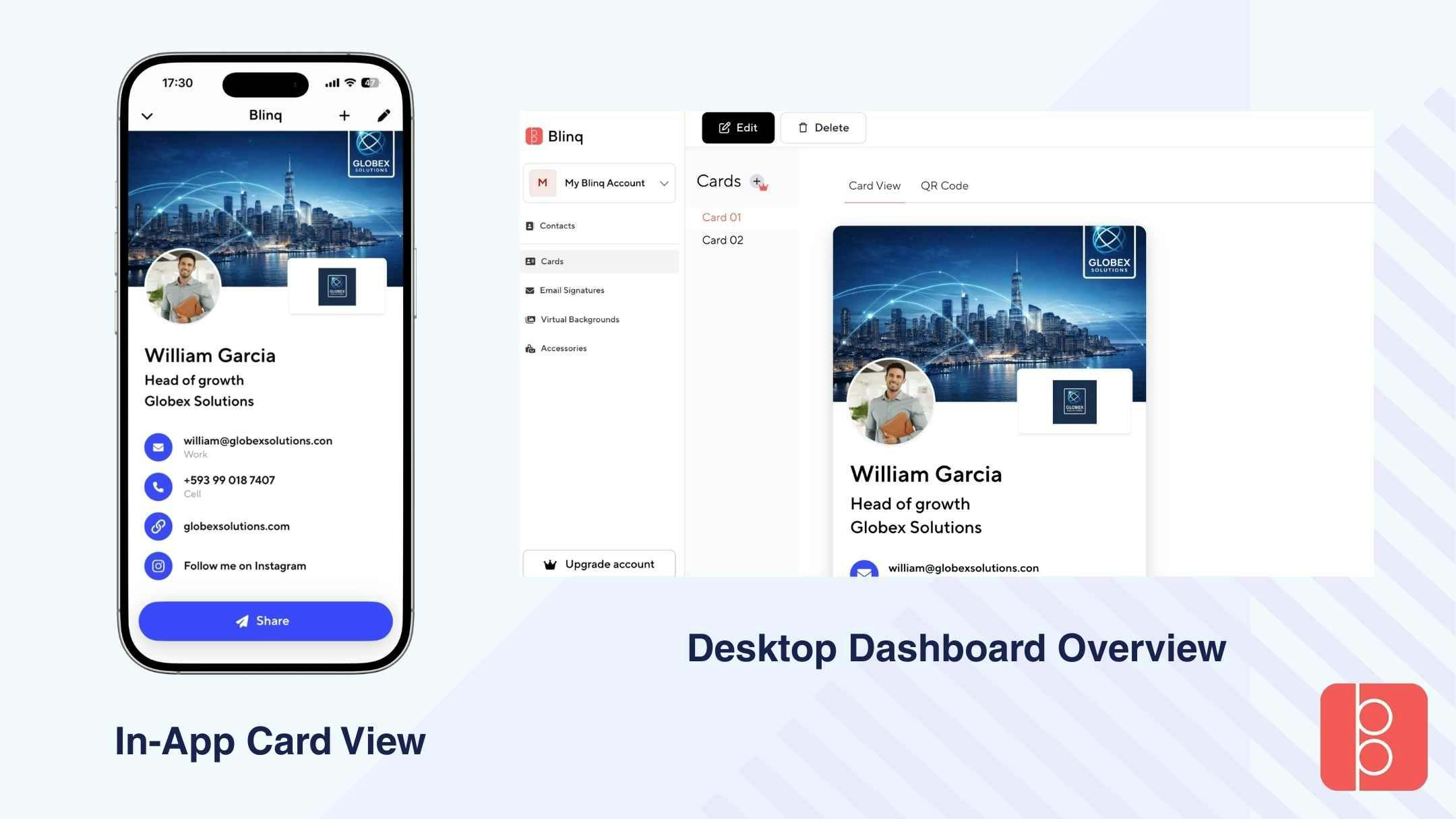
Desde la perspectiva de equipos, Blinq se siente como una plataforma pensada primero para usuarios individuales, con funcionalidades para equipos añadidas mediante actualizaciones de pago. La configuración inicial es rápida, pero las funciones de gobernanza del equipo no se muestran claramente durante el onboarding y son accesibles principalmente a través del panel de escritorio después de actualizar.
El control administrativo existe en los planes de equipo, pero el control de marca y la visibilidad estructurada son relativamente limitados en comparación con plataformas más centradas en la gobernanza. Aunque las integraciones CRM están disponibles en niveles superiores, el flujo de trabajo sigue centrado en compartir tarjetas, más que en la activación o el seguimiento estructurado.
La compartición es fiable, con códigos QR, soporte NFC, integración con Wallet y opciones de compartir en redes sociales. La captura de leads mediante escaneo con IA (tarjetas de visita y credenciales) funciona, pero el seguimiento profundo del engagement o las analíticas a nivel de equipo no forman parte de la experiencia principal.
En general, Blinq funciona para equipos que necesitan principalmente compartir tarjetas de forma estandarizada entre miembros, pero no proporciona un sistema profundamente estructurado de gestión de equipos ni de visibilidad del rendimiento.
| Fortalezas | Limitaciones según los criterios |
|---|---|
✅ Configuración de equipo rápida y sencilla (después de actualizar) | ❌ Las funciones de gobernanza no se muestran claramente dentro de la app |
✅ Soporte NFC para compartir físicamente | ❌ No ofrece analíticas significativas del equipo ni seguimiento de actividad |
✅ Roles básicos de administrador disponibles en los planes de equipo | ❌ No incluye un sistema integrado de tareas o recordatorios |
✅ Integraciones CRM en niveles superiores (HubSpot, Salesforce, etc.) | ❌ Los flujos de seguimiento dependen de herramientas CRM externas |
✅ Cumplimiento del GDPR y certificación SOC 2 | ❌ Diseñado más para compartir que para una activación estructurada |
Resumen de precios
Blinq ofrece funcionalidades para equipos a través de planes de pago. El acceso para equipos requiere actualizar el plan y se basa en un modelo de precio por tarjeta, con requisitos mínimos de licencias.
Teams: 4,99 $ / mes por tarjeta (facturado anualmente)
Mínimo de 5 tarjetas requeridas
Desde 300 $ / año
Los planes para equipos desbloquean controles de administrador, funciones de marca e integraciones CRM, pero las capacidades de gobernanza y analíticas siguen siendo relativamente limitadas en comparación con plataformas más estructuradas y centradas en equipos.
Casos de uso ideales
Blinq es más adecuado para equipos pequeños que necesitan principalmente compartir tarjetas digitales de forma consistente, sin requisitos complejos de gobernanza o workflows.
Funciona bien para equipos que:
- quieren tarjetas estandarizadas y simples para todos los miembros
- necesitan compartición física mediante NFC
- utilizan herramientas CRM externas en lugar de activación dentro de la app
- trabajan en entornos donde la rapidez del intercambio es más importante que las analíticas
Es menos adecuado para equipos que requieren enrutamiento estructurado de leads, seguimiento avanzado del rendimiento o control profundo del branding y del ciclo de vida de los usuarios a medida que escalan.
HiHello
Visión general de la experiencia
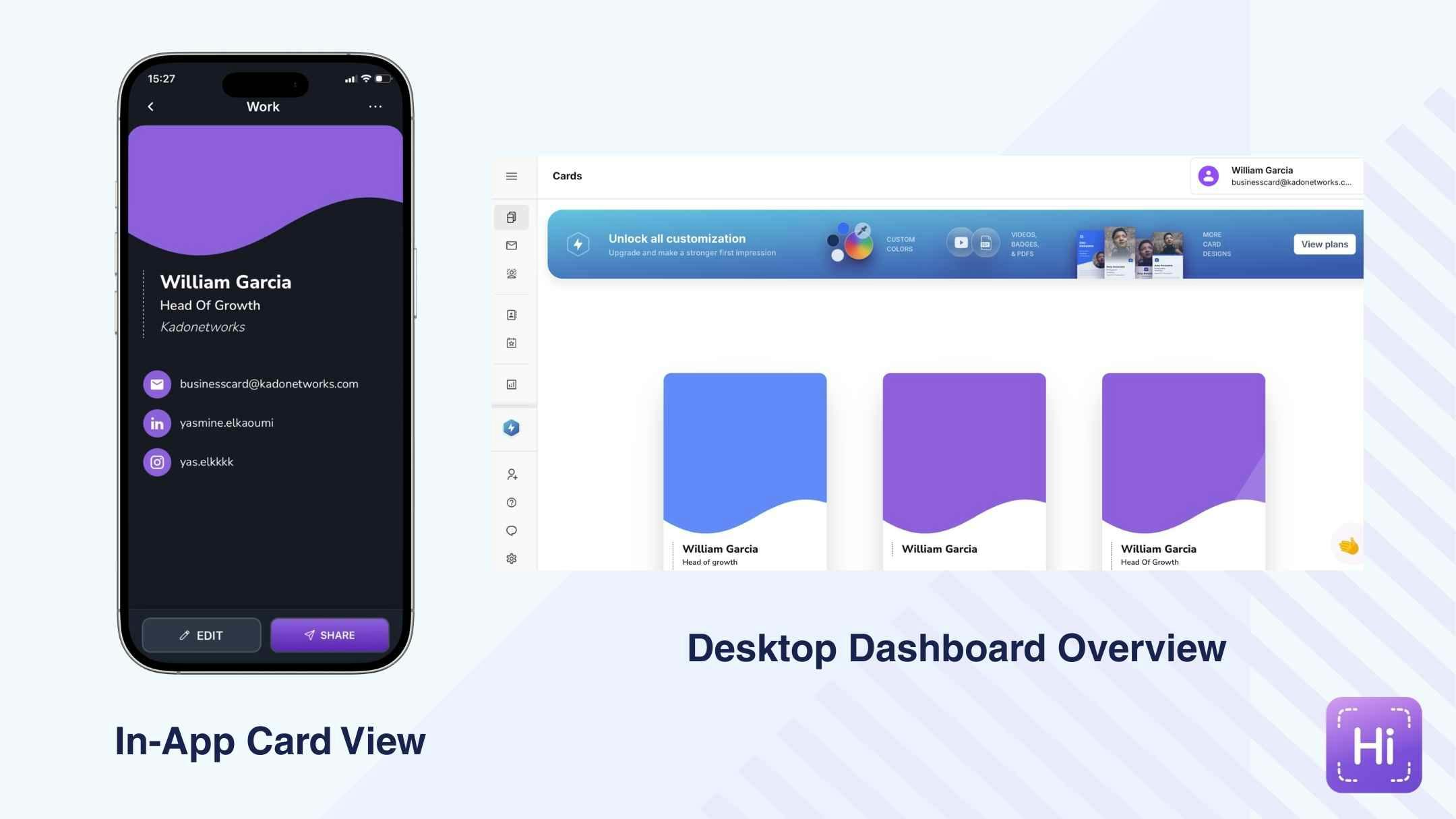
Desde la perspectiva de equipos, HiHello ofrece planes empresariales estructurados con gestión centralizada, pero la mayoría de las funcionalidades avanzadas se desbloquean solo después de actualizar el plan. La funcionalidad para equipos se gestiona principalmente a través del panel de control de escritorio, donde los administradores pueden controlar elementos de marca, asignar plantillas y supervisar las tarjetas de los miembros.
El onboarding es fluido a nivel individual, pero la configuración del equipo no se destaca dentro de la app y requiere una configuración intencionada. Los administradores pueden garantizar la consistencia de marca bloqueando logotipos, colores y diseños, lo que respalda la alineación de marketing en toda la organización.
La compartición es fiable mediante códigos QR online y offline, soporte para Wallet, widgets y distribución mediante enlaces. La captura de leads mediante QR o intercambio de tarjetas es fluida, y los contactos capturados pueden sincronizarse con sistemas CRM en los planes de pago.
Las analíticas están disponibles pero siguen siendo de alto nivel, centrándose en visualizaciones de perfil y número de contactos, en lugar de cronologías detalladas de engagement. En general, HiHello funciona como una plataforma estructurada de branding y compartición con conectividad CRM, más que como un sistema de activación basado en workflows.
| Fortalezas | Limitaciones según los criterios |
|---|---|
✅ Panel centralizado del equipo en los planes Business y Enterprise | ❌ La configuración y la gobernanza del equipo se gestionan principalmente desde escritorio |
✅ Bloqueo de plantillas de marca para mantener la consistencia visual | ❌ Las analíticas son de alto nivel y carecen de información profunda sobre el engagement |
✅ Compartición fiable mediante códigos QR online y offline | ❌ No incluye un sistema integrado de tareas ni un motor de seguimiento estructurado |
✅ Integraciones CRM (HubSpot, Salesforce, Zapier, Dynamics, etc.) | ❌ Visibilidad limitada dentro de la app sobre las métricas de rendimiento del equipo |
Resumen de precios
HiHello ofrece funcionalidades para equipos a través de sus planes Team y Enterprise. Los planes individuales y gratuitos no incluyen funciones de gestión de equipos.
Team Plan: 5 $ / usuario / mes
Enterprise: Precio personalizado (contactar con ventas)
Los planes Team desbloquean controles de administrador, plantillas de marca, integraciones CRM y analíticas a nivel de equipo. Los planes Enterprise amplían las capacidades de gobernanza, seguridad y gestión centralizada.
Casos de uso ideales
HiHello es más adecuado para equipos impulsados por marketing y organizaciones conscientes de la marca que priorizan la consistencia visual y el intercambio estructurado entre miembros.
Funciona bien para empresas que necesitan:
- bloqueo de plantillas y gestión centralizada
- sincronización con CRM
- perfiles estandarizados y presentación limpia
- analíticas básicas
Sin embargo, para organizaciones que dependen en gran medida de seguimiento avanzado del engagement, gestión integrada de tareas o enrutamiento estructurado de leads, HiHello puede resultar más centrado en el branding que en los workflows operativos.
Wave
Visión general de la experiencia
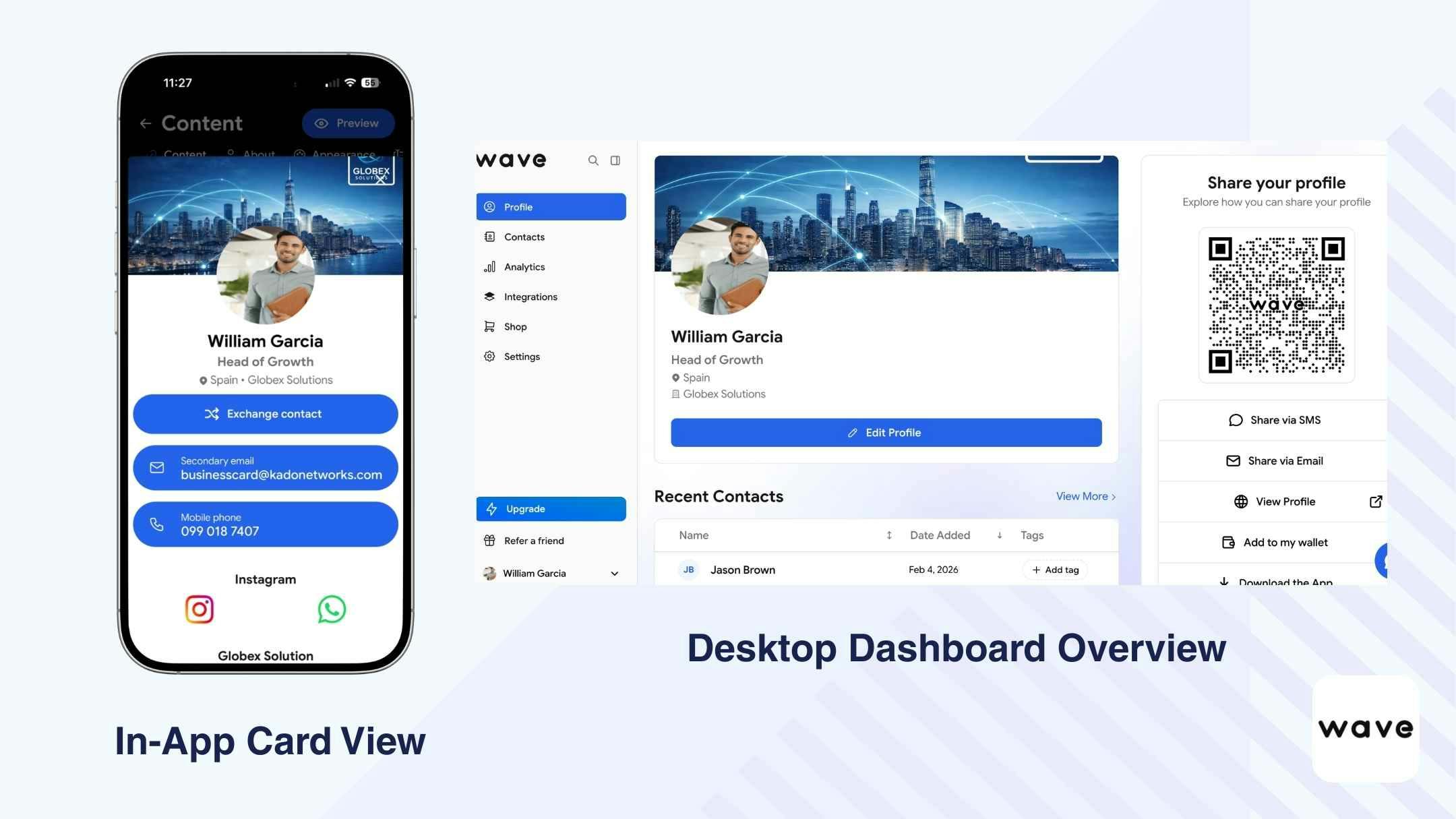
Desde la perspectiva de equipos, Wave ofrece una gobernanza estructurada, pero la mayoría de sus capacidades para equipos se desbloquean solo después de actualizar el plan y se gestionan principalmente desde escritorio. La plataforma admite múltiples niveles de administrador (Owner, Admin, Manager, Viewer, User), lo que proporciona a los equipos una jerarquía clara y control sobre los accesos.
La creación de tarjetas es rica en contenido, incluso en los niveles inferiores, permitiendo a los equipos incluir videos, enlaces, mapas y formularios estructurados de captación de leads. Sin embargo, el control de marca y el bloqueo de plantillas requieren planes Team o Enterprise.
La compartición funciona de forma fiable mediante códigos QR online y offline, soporte para Wallet, SMS, correo electrónico y acceso desde la pantalla de bloqueo.
La captura de leads incluye escaneo de credenciales y tarjetas de visita, además de emails o SMS automáticos de seguimiento opcionales. Las analíticas del equipo están disponibles en planes de pago y ofrecen visibilidad sobre métricas de engagement.
En general, Wave funciona como una plataforma de tarjetas digitales rica en contenido con funciones de gobernanza por capas, lo que la hace adecuada para equipos que valoran automatización y sincronización CRM, pero que están cómodos gestionando la administración principalmente desde escritorio.
| Fortalezas | Limitaciones según los criterios |
|---|---|
✅ Múltiples roles de administrador | ❌ La configuración del equipo no se muestra claramente dentro de la app (requiere actualización desde escritorio) |
✅ Bloqueo de plantillas y controles de marca en los planes de equipo | ❌ No incluye un sistema integrado de tareas o recordatorios para la gestión del seguimiento |
✅ Analíticas centralizadas del equipo (vistas, clics, contactos recopilados) | ❌ No ofrece soporte para widgets y las opciones de compartir en redes sociales son limitadas |
✅ Almacenamiento centralizado de leads entre los miembros del equipo | ❌ Los controles avanzados de marca están disponibles solo en planes de pago |
✅ Seguimiento automático mediante email/SMS disponible | ❌ Las analíticas muestran datos de rendimiento pero carecen de información comportamental profunda por contacto |
Resumen de precios
Wave ofrece funcionalidades para equipos a través de sus planes de equipo de pago. Los planes individuales no incluyen funciones completas de gobernanza ni controles de administrador.
Teams: 5 $ / usuario / mes
Mínimo de 3 usuarios requerido
Los planes de equipo desbloquean permisos basados en roles, bloqueo de plantillas, analíticas centralizadas, integraciones CRM y opciones de sincronización de directorios. Las capacidades de nivel Enterprise están disponibles mediante acuerdos personalizados.
Casos de uso ideales
Wave es más adecuado para equipos centrados en eventos, equipos de ventas sobre el terreno y organizaciones medianas que valoran el seguimiento automatizado y la sincronización con CRM.
Funciona bien para equipos que:
- quieren roles administrativos estructurados
- necesitan analíticas centralizadas
- desean automatización integrada por email o SMS después de capturar leads
- priorizan tarjetas ricas en contenido (videos, enlaces, formularios estructurados de captación de leads)
Sin embargo, los equipos que requieren seguimiento comportamental profundo, gestión avanzada de workflows o sistemas de tareas dentro de la app pueden necesitar depender de herramientas CRM externas para completar su proceso de activación.
Mobilo
Visión general de la experiencia
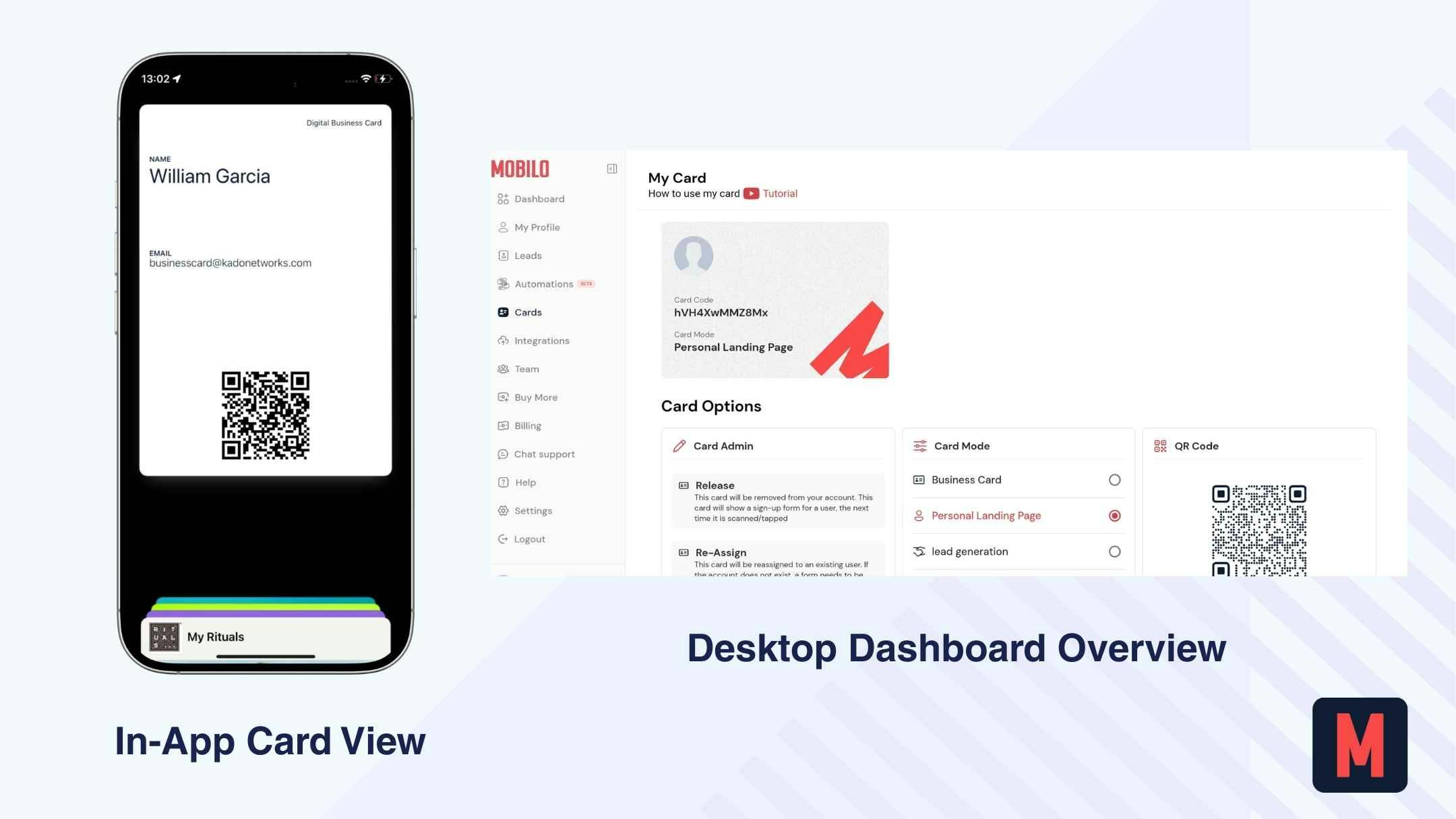
Desde la perspectiva de equipos, Mobilo se posiciona más como una solución centrada en hardware NFC que como una plataforma de workflow totalmente digital. El proceso de onboarding requiere introducir datos de pago desde el inicio (no existe un plan gratuito permanente), y la configuración tomó más tiempo en comparación con otras herramientas probadas. Durante las pruebas, la experiencia web se sintió lenta y la app móvil no estaba completamente funcional, lo que genera fricción inicial para equipos que esperan un despliegue mobile-first.
Para equipos, Mobilo incluye visibilidad administrativa centralizada, permisos basados en roles y estandarización de marca. También admite múltiples perfiles digitales por usuario, lo que resulta útil para diferentes roles, territorios o eventos. El intercambio se basa principalmente en tarjetas físicas con NFC y códigos QR dinámicos (solo online).
La captura de leads puede configurarse como unidireccional o bidireccional, con formularios opcionales y escaneo de tarjetas de visita mediante IA. Las integraciones CRM (Salesforce, HubSpot, Dynamics) están disponibles de forma nativa en los planes superiores.
En general, Mobilo parece diseñado para organizaciones que priorizan la distribución física mediante NFC y la sincronización con CRM, más que analíticas móviles, workflows estructurados de seguimiento o herramientas de activación dentro de la app.
| Fortalezas | Limitaciones según los criterios |
|---|---|
✅ Tarjetas físicas habilitadas con NFC | ❌ Solo códigos QR dinámicos (sin QR estático offline) |
✅ Soporte para integración HR (función de sincronización en desarrollo) | ❌ Los códigos QR son únicamente dinámicos (sin QR estático offline) |
✅ La experiencia móvil fue poco fiable en nuestras pruebas | ❌ No incluye un sistema integrado de seguimiento automático |
✅ Controles de marca y gestión de equipos basada en roles | ❌ Las analíticas son a nivel agregado y no ofrecen información profunda accionable |
✅ Integraciones CRM nativas | ❌ No está diseñado como una plataforma completa de gestión de relaciones |
Resumen de precios
Mobilo estructura sus funciones para equipos únicamente en planes de pago — no existe un nivel gratuito permanente para equipos.
Teams (Business Plan): 4 $ / usuario / mes
Enterprise: 5 $ / usuario / mes
El precio desbloquea funciones de gestión de equipos, almacenamiento centralizado de leads, controles de marca, permisos basados en roles e integraciones CRM nativas. Se requiere una tarjeta de crédito para comenzar, incluso durante el período de prueba.
Los planes de nivel superior incluyen controles de marca más avanzados, integraciones CRM nativas y administración centralizada del equipo.
Casos de uso ideales
Mobilo es más adecuado para organizaciones que distribuyen tarjetas físicas NFC a gran escala, como equipos de ferias comerciales, representantes de ventas sobre el terreno y empresas que priorizan interacciones activadas por hardware en lugar de networking basado en aplicaciones.
Funciona bien para equipos que ya dependen en gran medida de un CRM como Salesforce o HubSpot y quieren que los leads se sincronicen directamente en sus pipelines existentes.
Sin embargo, los equipos que buscan una experiencia mobile-first, workflows de tareas integrados o analíticas detalladas de engagement pueden encontrar que la plataforma no se ajusta completamente a sus necesidades diarias de seguimiento y activación.
La elección correcta depende de tu caso de uso
Diferentes equipos priorizan resultados distintos. La herramienta “mejor” depende de lo que tu equipo realmente necesita gestionar en su día a día.
| Tipo de equipo | Qué importa más | Por qué importa |
|---|---|---|
Equipos de ventas | Sincronización con CRM, enrutamiento de leads, seguimiento de actividades y analíticas a nivel de equipo. | Los equipos de ventas necesitan que los leads capturados pasen inmediatamente a los pipelines, se asignen correctamente y se supervisen para medir el rendimiento. Sin enrutamiento ni visibilidad, el seguimiento se vuelve inconsistente. |
Equipos de marketing | Control de marca, bloqueo de plantillas y atribución de campañas. | Los equipos de marketing se preocupan por la consistencia de la marca y una distribución medible. Necesitan plantillas estandarizadas y visibilidad sobre qué campañas o representantes generan engagement. |
Equipos de campo / eventos | Captura rápida de leads, QR offline, escaneo de credenciales y contactos compartidos. | En los eventos, la velocidad y la fiabilidad son fundamentales. Los equipos deben capturar leads sin fricción, incluso sin conexión, y centralizar los contactos para que nada se pierda después del evento. |
Startups en crecimiento (10–50 personas) | Administración sencilla, escalado asequible y onboarding/offboarding fácil. | Las startups necesitan gobernanza ligera sin la complejidad de soluciones enterprise. Agregar o eliminar miembros del equipo debe ser simple y rentable. |
No existe un ganador universal — la herramienta correcta es la que se alinea con el workflow diario de tu equipo y con su etapa de crecimiento.
Conclusión: ¿qué herramienta debería elegir tu equipo?
Según nuestras pruebas, nos inclinamos por KADO para equipos, especialmente por la forma en que conecta branding, compartición, captura de leads, seguimiento, analíticas y gobernanza en un sistema estructurado.
Dicho esto, la decisión correcta depende de las prioridades de tu equipo.
No existe una única “mejor” tarjeta de visita digital para equipos.
Solo existe la herramienta que encaja con la estructura de tu equipo, su proceso de ventas y su etapa de crecimiento.
Algunos equipos solo necesitan compartir tarjetas de forma simple con un control administrativo ligero. Otros necesitan sincronización con CRM, enrutamiento de leads, visibilidad analítica, control de marca y onboarding/offboarding escalable.
La verdadera pregunta no es qué herramienta es la más popular, sino qué herramienta respalda todo el workflow de tu equipo, desde la primera interacción hasta un resultado medible.
Por qué KADO cubre más escenarios de equipo
Entre configuración, gobernanza, compartición, captura, seguimiento, integración CRM y analíticas, muchas plataformas se detienen en la distribución de la tarjeta.
KADO conecta todo el workflow del equipo:
- Control de marca alto y consistencia de plantillas
- Compartición flexible (QR, Wallet, NFC, enlaces)
- Captura bidireccional y escaneo con IA
- Notas, etiquetas y creación de tareas integradas
- Analíticas en móvil y escritorio
- Integraciones CRM y de correo electrónico
- Permisos basados en roles y visibilidad administrativa centralizada
- Cumplimiento de GDPR y certificación SOC 2
Para los equipos, esto significa menos herramientas desconectadas y menos vacíos en el workflow.
Conclusión: KADO se alinea con más workflows reales de equipos porque no se detiene en el intercambio de la tarjeta, sino que también soporta lo que ocurre después.
👉 Puedes descargar KADO gratis y probarlo con tu equipo para ver cómo encaja en vuestro workflow.
Preguntas Frecuentes
¿Cuál es la mejor tarjeta de visita digital para equipos?
No existe una única “mejor” opción universal. La elección correcta depende de la estructura y del workflow de tu equipo. Dicho esto, KADO es una opción alta para equipos que necesitan más que un simple intercambio de tarjetas — especialmente si la sincronización con CRM, el almacenamiento centralizado de leads, los permisos basados en roles, las analíticas y el control de marca son importantes para ti.
Si tu equipo necesita funciones de gobernanza y activación, y no solo tarjetas digitales, deberías priorizar plataformas que soporten todo el workflow, no únicamente el intercambio.
¿Qué deberían buscar los equipos en una plataforma de tarjetas de visita digitales?
Los equipos deberían evaluar:
- Visibilidad administrativa y permisos basados en roles
- Control de marca y bloqueo de plantillas
- Profundidad de las integraciones con CRM
- Analíticas a nivel de equipo
- Almacenamiento centralizado de leads
- Soporte para QR offline
- Cumplimiento (GDPR, SOC 2)
Si una herramienta solo admite compartir tarjetas, pero no seguimiento ni gobernanza, puede que no escale bien para equipos.
¿Las tarjetas de visita digitales se integran con los CRM?
Sí, pero la profundidad de la integración varía. Algunas herramientas ofrecen integraciones nativas (Salesforce, HubSpot, Dynamics), mientras que otras dependen de Zapier o limitan la sincronización con CRM a planes de nivel superior. Para los equipos de ventas, la sincronización directa con el CRM y el enrutamiento de leads son fundamentales.
¿Las tarjetas de visita digitales son seguras para equipos?
La mayoría de los proveedores principales ofrecen cumplimiento con GDPR y certificación SOC 2. Sin embargo, las funciones de seguridad y cumplimiento suelen estar limitadas a los planes Team o Enterprise, por lo que es importante verificarlo antes de implementarlo en toda la empresa.
¿Las tarjetas de visita digitales pueden funcionar sin conexión en eventos?
Sí, muchas plataformas ofrecen códigos QR que funcionan sin conexión. Esto es especialmente importante para equipos de campo y equipos de eventos, donde la conectividad a internet puede ser inestable o poco fiable.
¿Es suficiente una tarjeta de visita digital para el networking de equipos?
No siempre. Para los equipos, la tarjeta es solo el punto de partida. Lo que realmente importa es lo que sucede después del intercambio: enrutamiento de leads, analíticas, sincronización con CRM y seguimiento estructurado. Las plataformas más completas conectan todos estos pasos dentro de un solo sistema.