Go back to list of posts
How to Digitize Business Cards for Teams and Enterprises
Last modified: August 14, 2026


To digitize business cards for teams means replacing paper with cloud-hosted, centrally managed smart card profiles shared via QR code, NFC, a short link, Apple Wallet, or Google Wallet. Every profile lives in one governed system where admins control templates, update details in real time, and pull analytics on every share and scan. Platforms built for this, including KADO, also connect to CRM systems like Salesforce and HubSpot, turning each exchange into a tracked lead rather than a forgotten stack of paper. SOC 2 and GDPR compliance are baseline expectations for enterprise procurement, not optional extras.
Key Takeaways
Digitizing business cards for teams requires central governance, CRM integration, and measurable KPIs — not just a digital format for individual cards.
| Point | Details |
|---|---|
Define governance first | Assign an admin owner and lock brand templates before provisioning any cards. |
Pilot with CRM sync live | Run a 30-day pilot with CRM mapping active and track scans, leads created, and follow-up rate. |
Multi-channel sharing matters | Cards must support QR, NFC, short link, and Wallet passes to cover every sharing scenario. |
Security is non-negotiable | Require SOC 2 Type II documentation, RBAC, SSO/SAML, and a GDPR data processing agreement. |
KADO for enterprise programs | KADO provides centralized templates, CRM integrations, analytics, and NFC/QR/Wallet sharing in one governed platform. |
Why Teams Move From Paper to Digital Business Cards
The operational case is straightforward: centralized digital card programs give IT and marketing a governed identity asset that feeds directly into CRM and HR systems, eliminating duplicate data entry and keeping every employee’s profile current without a reprint cycle.
The benefits compound quickly across a mid-size or enterprise team:
- ✅ Brand consistency — every card uses the same approved template, logo, and color system, so a new hire in Dallas looks identical to a senior rep in New York
- ✅ Real-time updates — a title change or new phone number propagates instantly; no one hands out outdated contact details
- ✅ Lead capture at the point of exchange — recipients fill a short form, and that data flows directly into your CRM as a new record
- ✅ Analytics on shares and clicks — track which contacts engage and which links drive conversions so sales can prioritize follow-up intelligently
- ✅ Faster onboarding — new employees get a fully branded card on day one, provisioned from a central template in minutes
- ✅ Procurement visibility — subscription costs are predictable; reprint budgets disappear
- ✅ Sustainability — no paper waste, no obsolete inventory
Statistic callout: Marketing analytics linked to networking interactions can improve event ROI by identifying high-value sources and optimizing follow-up strategy — a direct argument for connecting card shares to campaign measurement.
What to Look for When Evaluating a Digital Card Platform
The non-negotiables for enterprise procurement are central templates, admin controls, CRM sync, multi-channel sharing (QR, NFC, Wallet, short link), analytics, and documented SOC 2 or GDPR support. Everything else is a differentiator.
| Buyer question | Why it matters | What a strong answer looks like |
|---|---|---|
Can admins provision cards in bulk and update templates centrally? | Prevents brand drift and reduces IT overhead | Yes, with role-based access and template locking |
Which CRMs does it sync with natively? | Eliminates manual data entry and supports lead routing | Salesforce, HubSpot, Microsoft Dynamics, Zapier/API |
Does the QR code update dynamically? | Protects printed collateral from becoming outdated | Dynamic QR that redirects without reissuing the code |
Is SOC 2 Type II documentation available? | Required for most enterprise security reviews | Yes, with pen test reports on request |
Can we export contacts and data via API? | Prevents vendor lock-in and supports data governance | Full export and documented REST API |
Does it support Apple Wallet and Google Wallet passes? | Enables offline sharing when connectivity is limited | Native Wallet pass generation |
⚠️ Red flags to watch for:
- No admin audit logs or activity history
- CRM integration requires a third-party workaround only
- Static QR codes that cannot be updated after printing
- No API or data export option
- Vague compliance claims with no documentation
Pro Tip: Require a 30-day pilot that includes live CRM sync before signing an enterprise contract. If leads captured during the pilot do not appear cleanly in your CRM as mapped records, the integration is not production-ready.
How to Roll Out Digital Cards Across Your Organization
Start with a pilot group, validate the CRM mapping and analytics, then provision the full organization. Skipping the pilot phase is the single most common reason enterprise rollouts stall.
| Phase | Duration | Key milestones |
|---|---|---|
Decision and vendor selection | a few weeks | RFP, security review, pilot agreement signed |
Pilot (select user group) | about one month | Templates built, CRM sync live, KPIs defined |
Pilot evaluation | about one week | Review scans, leads created, CRM match rate, follow-up rate |
Phased rollout (department by department) | several weeks | Provisioning, training sessions, quick reference guides |
Full governance and optimization | Ongoing | Admin ownership assigned, quarterly analytics review |
Pilot checklist:
- Select a small group of users across sales, events, and recruiting
- Build a few branded templates covering different roles
- Map card capture fields to CRM lead fields before the first event
- Run at least one live event or trade show during the pilot
- Track key KPIs such as scans, leads created, CRM match rate, and follow-up rate
Change management matters as much as the technology. Assign a named admin owner, run a 30-minute onboarding session for each team, and distribute a one-page quick reference card. Teams that skip training see adoption rates drop sharply in the first 60 days.
Workflows That Turn Card Shares Into Measurable Outcomes
Digital card programs produce their clearest ROI when the share event connects directly to a CRM record, a follow-up task, and a tracked campaign. Here are four workflows where that connection pays off.
[VIDEO EMBED: sample event workflow showing QR scan → lead capture form → CRM record creation → assigned follow-up task]
- Trade show prospecting — a sales rep shares their card via QR; the prospect fills a short capture form; the record lands in Salesforce with the event name as a UTM source; a follow-up task is auto-assigned to the rep within 24 hours
- Field sales — a rep taps their NFC card against a prospect’s phone; the prospect saves the contact and submits their email; the rep sees the engagement in their analytics feed and calls that afternoon
- Recruiting events — a recruiter shares a card with a role-specific template; candidates submit their LinkedIn profile through the capture form; the recruiter’s ATS receives the record automatically
- HR onboarding — new hires receive a provisioned card on day one via the HR team template; the card is live before their first meeting, with no manual setup required
Short links with UTM parameters and dynamic QR codes connect each in-person exchange to a measurable campaign, so marketing can attribute pipeline to specific events rather than guessing.
KADO’s contact management features support this entire flow: lead capture forms, notes, tags, reminders, and CRM sync keep every new contact organized from the moment of exchange through to closed deal or hired candidate.
Security and Compliance Checks Before Enterprise Deployment
The top controls to verify before procurement sign-off: encryption in transit and at rest, role-based access control (RBAC), audit logs, SOC 2 Type II compliance, and GDPR readiness.
Security checklist:
- ✅ RBAC with granular permission levels (admin, manager, user)
- ✅ SSO/SAML integration for identity management
- ✅ Data residency options for regulated industries
- ✅ Encryption in transit (TLS 1.2+) and at rest (AES-256 or equivalent)
- ✅ Penetration test reports available on request
- ✅ Vendor security questionnaire support
Compliance checklist:
- ✅ SOC 2 Type II report available
- ✅ GDPR data processing agreement (DPA) on file
- ✅ CCPA compliance documentation
- ✅ Audit trail for all admin actions
- ✅ SLA with defined uptime and incident response terms
One privacy point worth enforcing in your contract: limit data retention on shared contact capture forms to the minimum necessary, and confirm that every capture form displays a clear consent notice. Captured lead data is personal information under both GDPR and CCPA, and your vendor’s form defaults should reflect that.
Cost Framing and a Simple ROI Model
Digital programs typically pay back within 6–18 months for event-heavy teams, with the clearest savings coming from eliminated reprints and the clearest upside from tracked lead conversion.
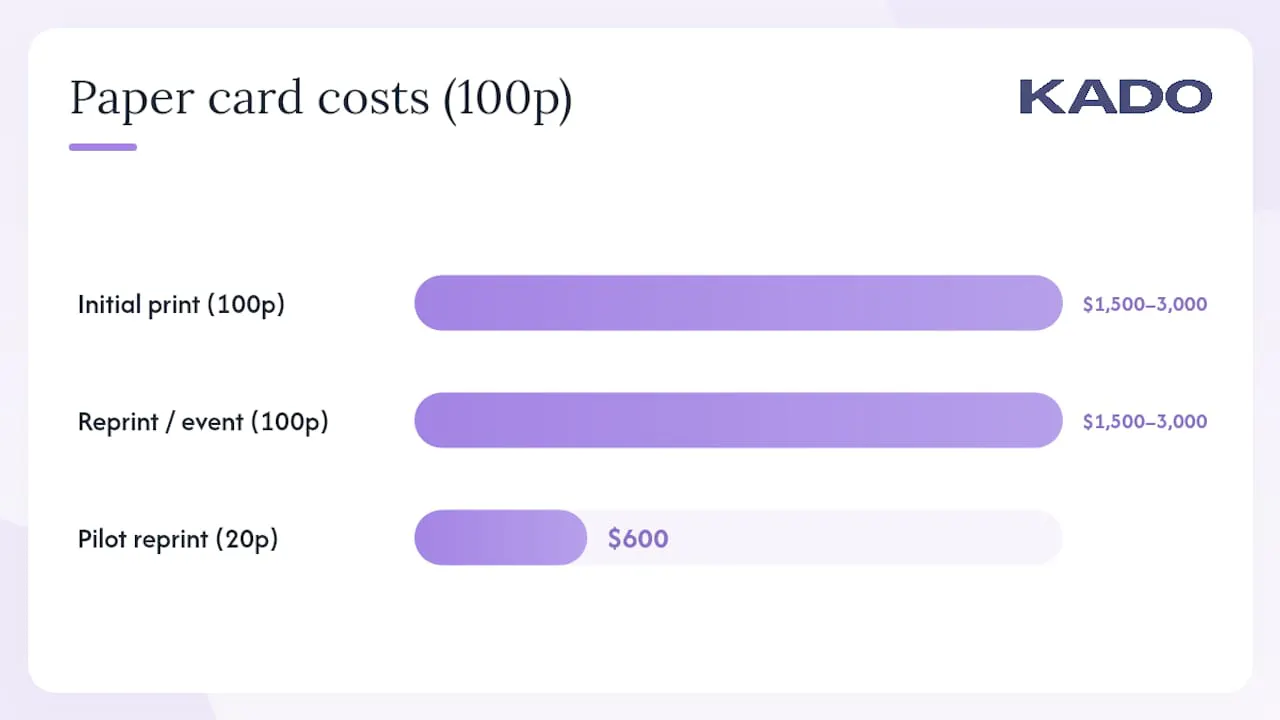
| Cost item | Paper cards (100-person team) | Digital subscription (100-person team) |
|---|---|---|
Initial design and print | $1,500–$3,000 per run | $0 (templates built once) |
Reprint on title/brand change | $1,500–$3,000 per event | $0 (real-time edit) |
Annual subscription | $0 | Varies by vendor and tier |
Leads tracked per major event | 0 (no capture mechanism) | Measurable via analytics |
A conservative pilot scenario: a 20-person sales team attends four trade shows per year. Paper cards cost roughly $600 per reprint cycle. Even at a modest average deal size, the revenue attribution from four events exceeds the annual subscription cost by a wide margin.
Cost levers to quantify during your pilot:
- Print and reprint savings (design, production, shipping)
- Admin time saved on manual contact entry
- Onboarding speed improvement (days to first card)
- Conversion lift from tracked follow-ups versus untracked paper exchanges
Brand consistency across every card also reduces the hidden cost of off-brand materials circulating after a rebrand, a cost most procurement teams never measure until it shows up in a brand audit.
What We’ve Seen Work — and What Stalls Rollouts
The teams that get the most from a digital card program share one habit: they assign a named owner before the pilot starts. Without governance ownership, templates drift, CRM mapping gets skipped, and adoption stalls within 90 days. The technology is rarely the problem.
The three pitfalls we see most often are no CRM field mapping before launch, insufficient training, and no defined KPIs to evaluate the pilot. Successful rollouts have high card usage rates within the first month, consistent templates across all roles, and at least one event where leads captured via digital forms appear cleanly in the CRM without manual cleanup.
Our recommendation: assign an owner, define four KPIs (scans, leads created, CRM match rate, follow-up rate), and run a 30–60 day pilot with a real event in the window. The data from that pilot will tell you more than any vendor demo.
KADO Gives Teams a Centrally Managed Card Program That Connects to Your CRM
Paper cards leave your networking activity unmeasured. KADO replaces that gap with a governed digital card program where every share is tracked, every lead is captured, and every template stays on-brand without a reprint.
KADO connects directly to Salesforce, HubSpot, Microsoft Dynamics, Outlook, Google, and Zapier. Cards are shared via QR, NFC, short link, Apple Wallet, and Google Wallet, across web, iOS, and Android. Admin controls let you provision cards at scale, lock brand templates, and pull analytics on team-wide sharing activity. SOC 2 and GDPR documentation is available for enterprise security reviews.
The lead capture and contact management workflow handles the full cycle: capture form at exchange, notes and tags in the app, CRM sync, and follow-up reminders. For teams focused on event ROI, the event measurement tools show exactly which shows and reps drive pipeline.
Start a free trial or request a demo at Kadonetworks to see how the platform fits your team’s workflow.
Sources
Frequently Asked Questions
What does it mean to digitize business cards for a team?
It means replacing paper cards with cloud-hosted smart card profiles that each employee shares via QR, NFC, short link, or Wallet pass, all managed from a central admin dashboard with brand templates and CRM integration.
How long does a typical enterprise rollout take?
Most teams complete the decision, pilot, and phased deployment in a few weeks to a few months, with the 30-day pilot being the most critical phase for validating CRM sync and adoption.
What KPIs should we track during the pilot?
Track four metrics: scans per event, leads created, CRM match rate, and 30-day follow-up rate. These four numbers tell you whether the program is producing measurable pipeline, not just digital cards.
Does KADO support NFC and wallet passes?
Yes. KADO supports NFC sharing and multi-platform access across web, iOS, and Android, along with Apple Wallet and Google Wallet pass generation for offline sharing scenarios.
What compliance documentation should we request from any vendor?
Request a SOC 2 Type II report, a GDPR data processing agreement, CCPA compliance documentation, and evidence of SSO/SAML support and role-based access controls before signing an enterprise contract.