Go back to list of posts
Conference Lead Capture: Sync to CRM in Under 60 Seconds
Last modified: September 17, 2026


The fastest way to secure conference leads is a badge scan or QR capture that writes to your CRM within 60 seconds and triggers score-based follow-up before the attendee leaves the hall. Everything else, from booth staffing to nurture emails, exists to support that one priority. Get the capture-to-CRM handoff right, and even a mediocre booth conversation turns into a real pipeline entry.
Most effective lead capture methods include badge scanning for high-traffic booths and QR code exchanges for smaller or relationship-focused settings, with hybrid approaches covering broader traffic. Qualification should be done in real time with quick questions and scoring, emphasizing hot leads over 70 scored instantly for immediate follow-up. CRM data must sync within 60 seconds to prevent losing hot leads to competitors, requiring pre-event testing of sync speeds and automation rules. Reliable onsite technical setups include backup devices, offline queuing, tested field mapping, and shift handoffs to avoid data loss during the event. Immediate and tiered follow-up—within hours for hot leads, 24 hours for warm, and a week for cold—significantly improves conversion chances.
What Are the Best Conference Lead Capture Methods? Every capture method trades speed for detail, and knowing which trade-off fits your booth traffic matters more than owning the fanciest scanner.
- Badge scanning: Fastest option, often taking just a few seconds per scan, pulling registration data straight from the event system. Best for high-traffic booths where lines form fast.
- QR/digital business card exchange: Nearly as fast, and it lets attendees capture your rep’s info too. Ideal for smaller booths or one-on-one conversations at a digital business card exchange point.
- OCR/photo scan of paper business cards: Useful when attendees hand over a physical card, but accuracy varies with lighting and card design.
- Manual entry: Slowest and most error-prone, reserved for edge cases like a broken scanner or a VIP conversation worth a longer form.
- Kiosk self-check-in: Works for demo stations but rarely captures qualification context on its own.
For most exhibitors, a hybrid of badge scan plus QR fallback covers the widest range of booth traffic without slowing down the line.
How Do You Qualify Leads Without Slowing Down the Line?
Qualification has to happen in the fifteen seconds a rep actually has with someone, not in a follow-up call three days later.
Ask a short set of questions the moment you capture contact info:
- What brought you to this booth today?
- What’s your role in the buying decision?
- Are you evaluating solutions now, or just researching?
- What’s your timeline to make a decision?
- Who else is involved in this purchase?
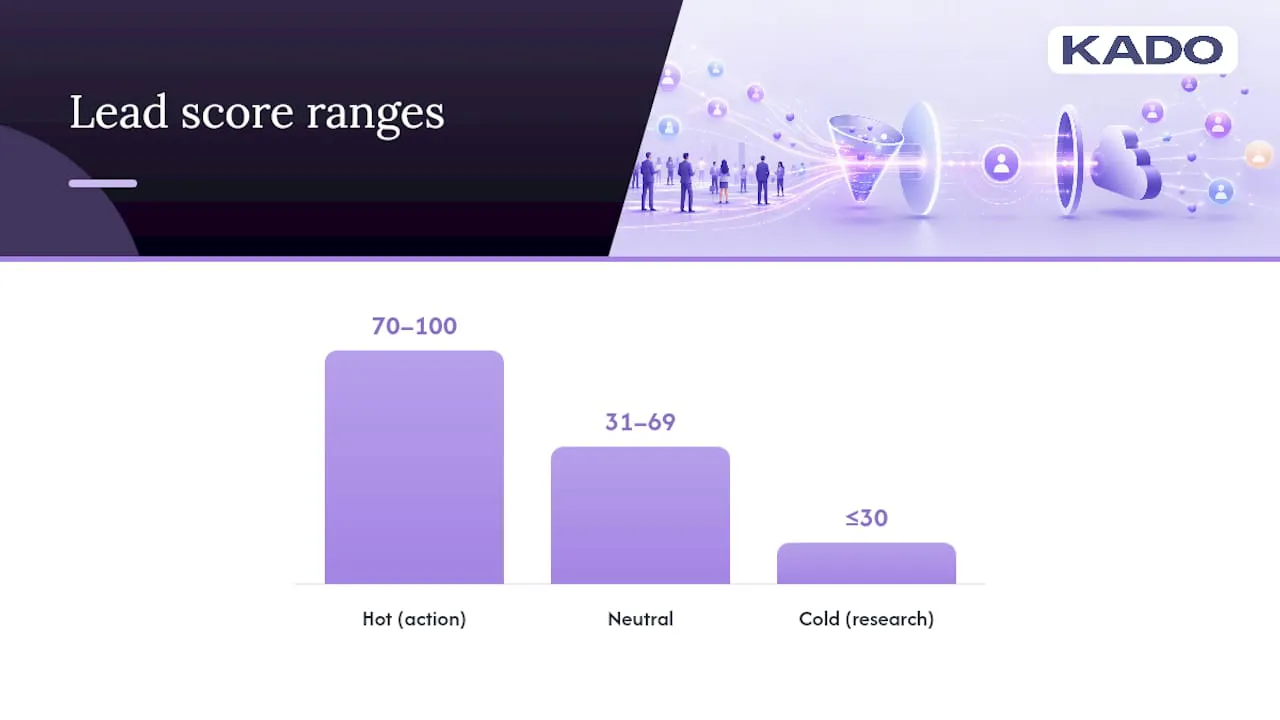
Score each answer on a simple 0 to 100 scale: budget authority and active timeline push a lead into the 70 to 100 “hot” range, casual research pushes it toward 30 or below. Anything above 70 should trigger an instant alert to a rep, not a batch email the next morning.
Voice notes matter more than most exhibitors realize. A ten second recording (“wants a demo before their Q2 renewal, mentioned a competitor by name”) preserves context that a checkbox never will, and event capture platforms increasingly build this in alongside OCR and offline capture.
Pro Tip: Assign one team member per shift to review voice notes within the hour, not at the end of the day. Context fades fast once you’re back to booth traffic.
Why CRM Sync Speed Determines Whether Leads Convert
A lead that sits in an export file until Friday is a lead a competitor has already called. The technical target here is straightforward: captured data should land in your CRM in under 60 seconds, not at the end of the day.
Test this before the event, not during it. Run a dummy capture, time the sync, and confirm every field mapped correctly.
- Map booth-specific metadata (event name, booth number, session attended) into custom CRM fields.
- Confirm bi-directional sync with Salesforce or HubSpot so rep updates flow back into your event tool.
- Set automation rules to assign lead owners by territory or product line the instant a lead scores above your hot threshold.
- Tag every record by event source so pipeline reporting doesn’t blur together six months of trade shows.
Modern lead capture platforms increasingly close this gap on their own. Many now enrich and sync data to CRM in under 60 seconds, and bi-directional integration with tools like HubSpot and Salesforce is now standard enough that it should be a checklist item during vendor selection, not an afterthought.
What Should Your On-Site Technical Setup Checklist Cover?
Lost leads almost always trace back to a technical gap nobody checked before the show floor opened.
- Bring at least one backup device per two staffers, plus battery packs rated for a full show day.
- Confirm your capture app queues scans offline and syncs automatically once connectivity returns. Enterprise capture tools now build offline queuing in by default, since convention center Wi-Fi is notoriously unreliable.
- Run three or four test captures the morning of the show and verify every field maps into your CRM correctly before doors open.
- Build a shift handoff process. Have the outgoing rep briefly log which leads are mid-conversation to avoid duplicate entries when the next shift takes over.
Pro Tip: Print a one-page “if the app fails” card with a manual capture fallback. A five-minute outage shouldn’t cost you a lead.
What Follow-Up Timing Actually Converts Event Leads?
Speed and relevance both matter, and the sequence should differ by how hot the lead scored on the floor.
- Within 1 to 4 hours for hot leads (score 70+): a short, personalized message referencing the actual conversation, not a template blast.
- Within 24 hours for warm leads: a scheduled nurture email tied to what they said they were evaluating.
- Within the first week for cold or research-stage leads: an automated sequence introducing your product category without a hard pitch.
Automation should trigger these tiers the moment a lead lands in CRM, tagged by score and event source, so reps aren’t manually sorting a spreadsheet two weeks later. Track reply rate, meetings booked, and pipeline dollars attributed back to the specific event. Those three numbers tell you whether the booth spend was worth it far better than badge-scan totals alone.
How Does KADO Support This Capture-to-Follow-Up Workflow?
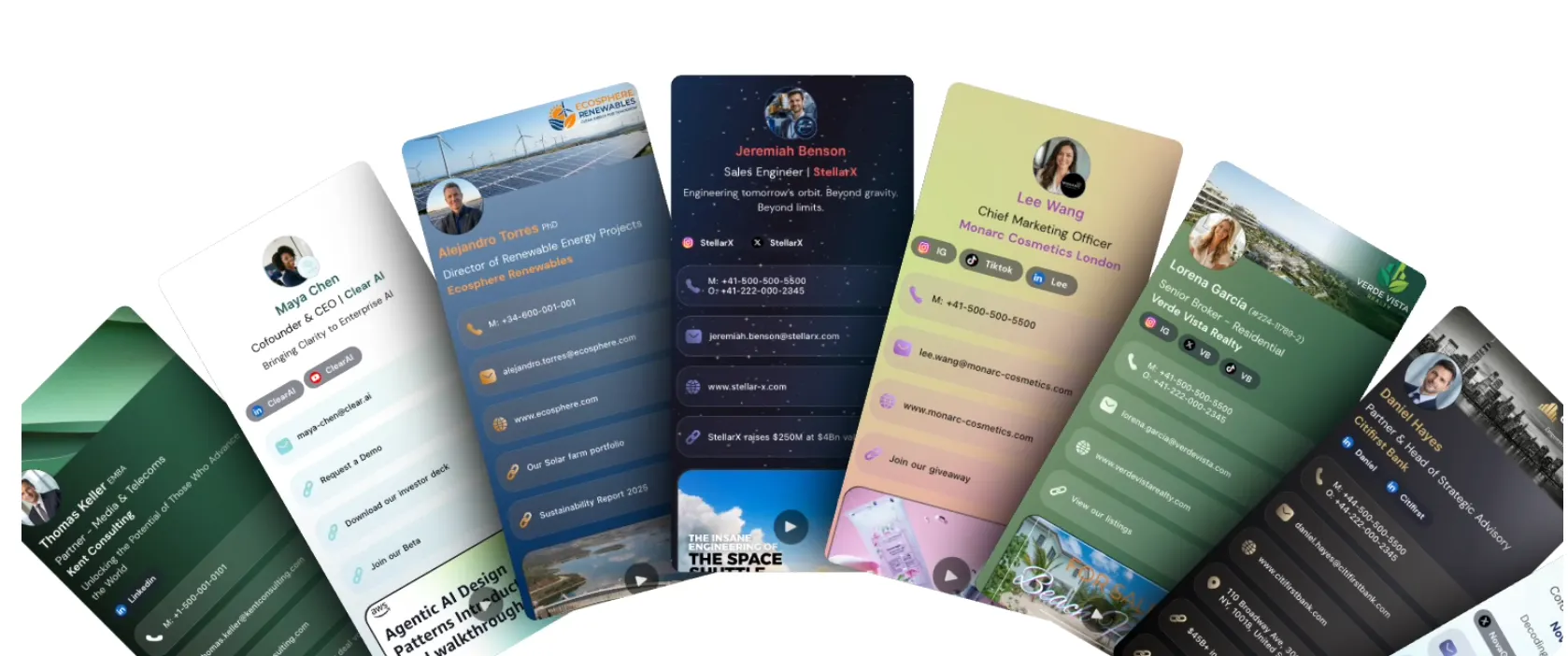
Digital business card platforms typically fit directly into this sequence rather than replacing it. Representatives share a digital business card by QR code, NFC tap, or digital wallet pass, and attendees can submit details through a built-in lead capture form on the spot.
- Notes, tags, and follow-up reminders attach to each contact right after the conversation, preserving the same context a voice note would.
- Admin controls can keep each representative’s card and messaging consistent across a multi-person booth.
- CRM integrations with popular platforms can route captured contacts into existing pipelines without manual re-entry.
- Analytics can show which representatives and digital cards drove the most engagement, providing insights for event teams.
For teams running a qualification and sync workflow, digital card platforms can act as the capture layer that keeps data organized instead of scattered across export files.
How Do You Clean Up and Deduplicate Event Data Afterward?
Every event produces duplicate and inconsistent records, and the cleanup window right after the show is when it’s cheapest to fix.
Start with an export audit within 48 hours. Pull every captured lead into one view and look for the obvious duplicates first: the same email captured twice because a prospect visited your booth on both show days, or a business card scanned by two different reps who didn’t realize they’d both talked to the same person.
Standardize formatting before merging anything. Job titles, company names, and phone numbers come in inconsistent from OCR scans and manual entry alike, “VP of Sales” versus “Vice President, Sales” will read as two different fields to most CRM matching logic. Normalize these before you run deduplication rules, or the automated match will miss obvious overlaps.
Run your CRM’s native dedupe tool second, not first. Most platforms match on email domain and name similarity, but they’ll flag false positives, two different people at the same company with similar names, so a human should spot check the merge queue rather than approving it in bulk.
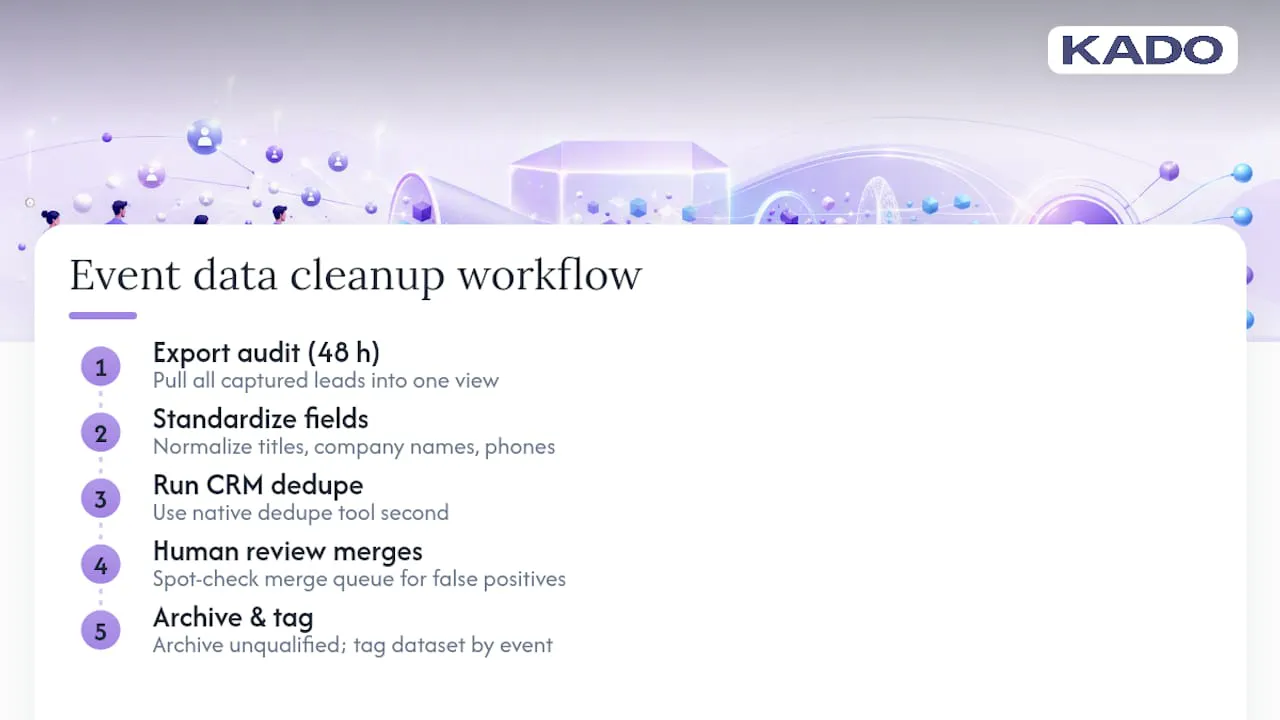
Archive anything that didn’t meet your qualification bar rather than deleting it outright. A “researching” lead from this year’s show is often a “ready to buy” lead at next year’s event, and enrichment tools that maximize lead quality through digital contact capture work far better on records that were captured cleanly the first time.
Finally, tag the cleaned dataset by event before it moves into long-term nurture. This is the step teams skip most often, and it’s the reason six months later nobody can say which trade show actually drove which deal.
Practitioner Perspective: What Actually Breaks Lead Capture
The failures we see most aren’t exotic. Slow CRM sync, forms too long for a busy aisle, and no owner assigned to hot leads within the hour. Fix those three and conversion improves almost immediately, often before you touch messaging or booth design at all.
— KADO
Ready to Put This Workflow Into Practice?
Badge scanners and paper card boxes solve capture speed but leave qualification and follow-up as a separate, manual step. KADO closes that gap by combining the digital card exchange, the lead capture form, and the CRM sync into one motion at the booth.
A rep taps an NFC card or shares a QR code, the prospect’s details land in a shared contact pool with notes and tags attached, and integrations with Salesforce, HubSpot, and Zapier push the record into your existing pipeline without a spreadsheet export in between. Team admin controls keep every card on-brand across a multi-person booth, and analytics show which conversations actually turned into meetings. If your next event is on the calendar, create a digital business card and test the full capture-to-follow-up flow before you’re back on the show floor.
For teams also refining nurture timing after the event, this lead nurturing guide breaks down sequencing tactics that pair well with the tiered follow-up approach above.
Sources
Claims on sync timing, offline capture, and CRM integration draw on Captello’s event lead capture overview, BoothMaven’s lead capture app documentation, and exhibitor order forms such as the ATD Conference lead retrieval form.
Frequently Asked Questions
What Is the Best Way to Capture Leads at Events?
A badge scan or QR/digital card exchange paired with a short on-the-spot qualification question performs best, since it captures contact data and buying intent in one motion instead of two.
What Is the Best Software for Capturing Leads at Events?
The best fit depends on booth format: high-traffic booths benefit from badge-scan apps with CRM sync under 60 seconds, while relationship-driven booths often do better with digital business card platforms like KADO that combine capture with notes, tags, and follow-up reminders.
What Is the Best App for Capturing Leads?
Look for an app that offers offline capture with automatic sync, CRM integration with Salesforce or HubSpot, and a qualification form short enough to complete during the short conversation with a lead.
What Is Lead Retrieval at a Conference?
Lead retrieval is the process exhibitors use to scan or exchange attendee badge and contact data at a booth, typically through a rented scanner or a mobile app that syncs directly to a CRM.
How Fast Should Captured Leads Reach the CRM?
Under 60 seconds is the practical benchmark, since modern lead capture platforms now routinely hit that speed, and any longer delay increases the odds a hot lead cools before a rep follows up.